 CoreAxis School ERP
Finance · Chapter 29
Fee Structure
Fee Structure decides what every student is billed: the fee heads, the amount of each head for each class, whether tuition is billed monthly or in instalments, the late-fee rule, the cheque bounce charge and extra charges such as exam fee, transport or hostel. Admin / Principal can change it; accountants can see it but not save changes. Changes affect every student's dues, so plan them before the session starts.

Screen at a glance
- Monthly tuition
- Lowest to highest monthly tuition across classes (₹400 – ₹1,200), number of classes and fee heads.
- Instalment plan
- How tuition is billed: Monthly, Quarterly, Termly, Half-yearly, Annual or Custom.
- Late fee
- On or Off, with the rule.
- Extra charges
- Number of active extra charges (transport, hostel, exam, annual …).
- Class fees tab
- Fee Heads list, Set Fee for a Class and the Class-wise Fee Summary.
- Instalment plan tab
- School plan and a different plan for some classes.
- Late fee & bounce tab
- Late-fee rule and the Cheque / DD bounce charge.
- Extra charges tab
- One-time or monthly charges for all students, a class, one student, a transport route or hostel students.
- Add fee head (button)
- Creates a new head such as Smart Class Fee (Admin / Principal).
See and set the fees of a class (example: Class IV-A)
Open Fee Structure. The Class fees tab opens first. Until you choose a class, Set Fee for a Class says "Choose a class above to set its fees."
KPI cards and the four tabs. In Set Fee for a Class, choose Class IV-A. Each fee head shows its amount: Tuition Fee (Monthly) ₹800, Annual Charges (Annual) ₹1,500, Examination Fee (Annual) ₹600.
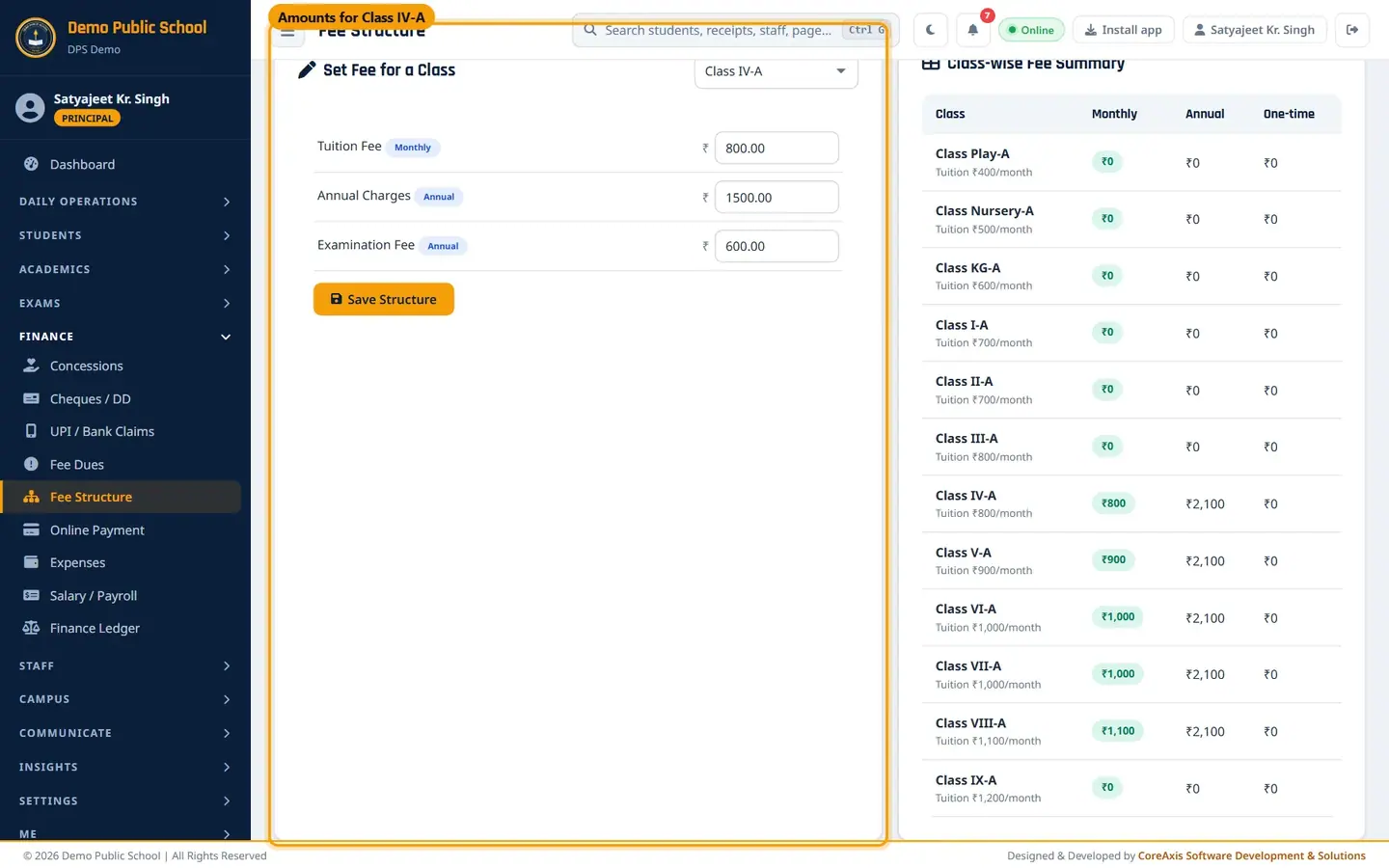
Amounts of each head for Class IV-A. To change an amount, type the new figure and click Save Structure, then Confirm (Admin / Principal).
Check the Class-wise Fee Summary on the right. Under each class name you see its monthly tuition from the Classes page, for example "Tuition ₹800/month (class fee)". The Monthly column starts from that class fee and adds any other monthly heads (quarterly heads ÷ 3); Annual and One-time add up the heads set for that class (Class IV-A: Monthly ₹800, Annual ₹2,100).

Summary of all classes: Monthly starts from each class's tuition fee.
TipMonths already billed keep their old price. Admin can use the re-price option on this tab to change months already billed for a class.
TipMonthly tuition is billed from the class's monthly fee (Academics › Classes). A Tuition Fee head here is the same fee, not an extra one; if its amount differs from the class fee, the summary shows a warning under the class name.
Add a fee head (example: Smart Class Fee, monthly)
Click Add fee head, then Add fee head in the popup.
Type the Head name, for example
Smart Class Fee, and choose its type: Monthly, Quarterly, Annual or One-time.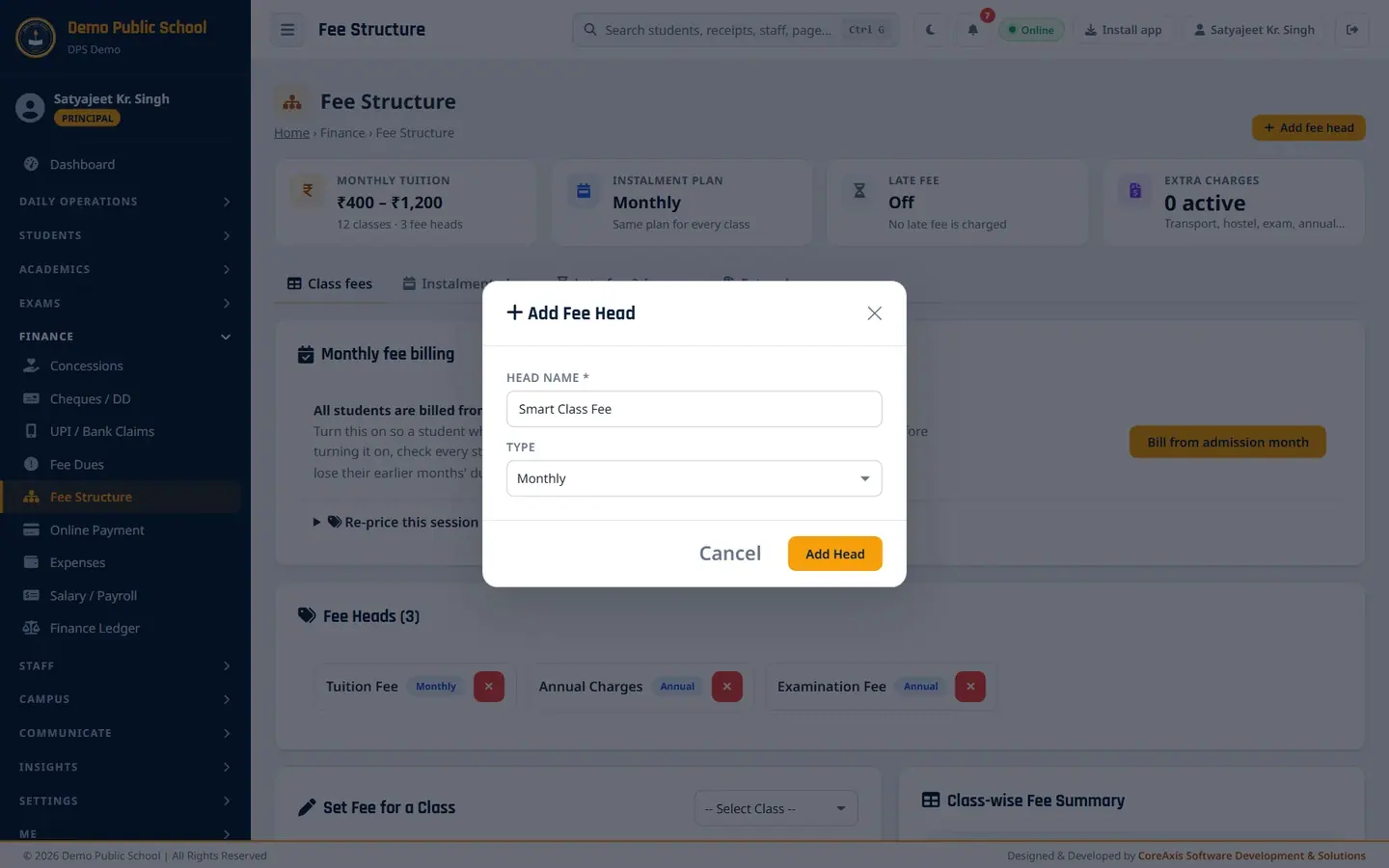
New fee head form. Click Add Head and confirm. The message "Fee head added. It can now be collected at the Fee Desk." appears. Then set its amount for each class in Set Fee for a Class.
TipEvery Fee Structure head is also a Fee head at the Fee Desk, so the office can collect it there (Annual Charges, Examination Fee, Smart Class Fee …).
ImportantDeleting a fee head is permanent. Do it only for a head that was created by mistake.
Instalment plan
Open the Instalment plan tab.

School plan and class-wise plans. Choose the School plan: Monthly, Quarterly (4 instalments), Termly (3), Half-yearly (2), Annual (1) or Custom (tick the months where an instalment starts). The demo school bills Monthly.
Under Different plan for some classes, choose another plan for a class if needed, for example Quarterly for Class VIII.
Click Save instalment plan and confirm. Every student's dues are rebuilt; money already paid stays as an advance.
TipWith an instalment plan, all months of an instalment fall due together on its due date (its first month + the late-fee due day, 10). The Fee Desk then shows instalment chips instead of month chips.
Late fee rule (example: ₹50 per late month after the 15th, up to ₹200)
The demo school has the late fee switched off. The example below shows how a school would fill it.
Open the Late fee & bounce tab.
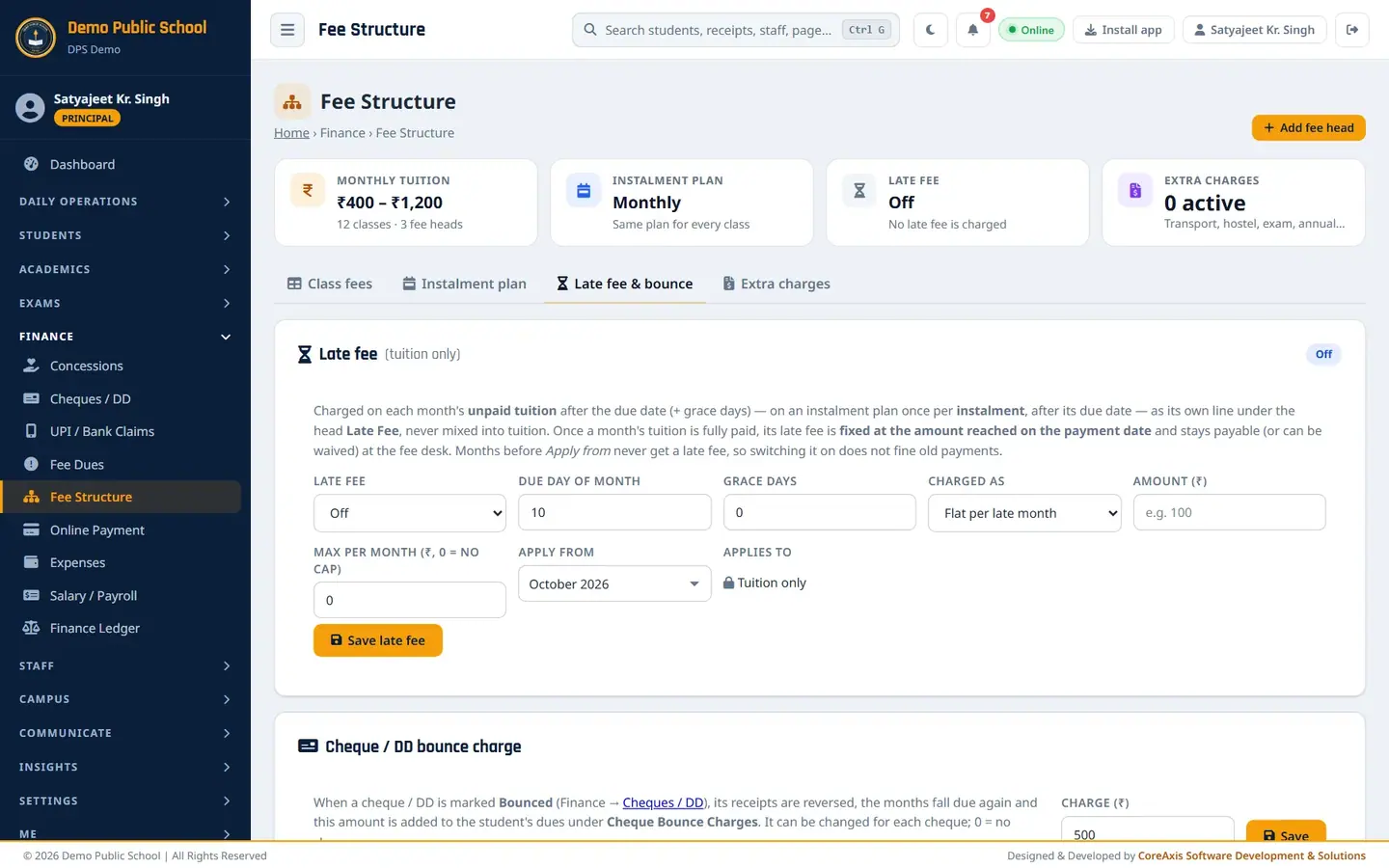
Late fee (Off) and the cheque bounce charge (₹500). Set Late fee to On.
Type Due day of month
10and Grace days5. The late fee starts after the 15th.Choose Charged as: Flat per late month (or Per day late) and type Amount (₹)
50.Type Max per month (₹, 0 = no cap)
200and choose Apply from, for example October 2026.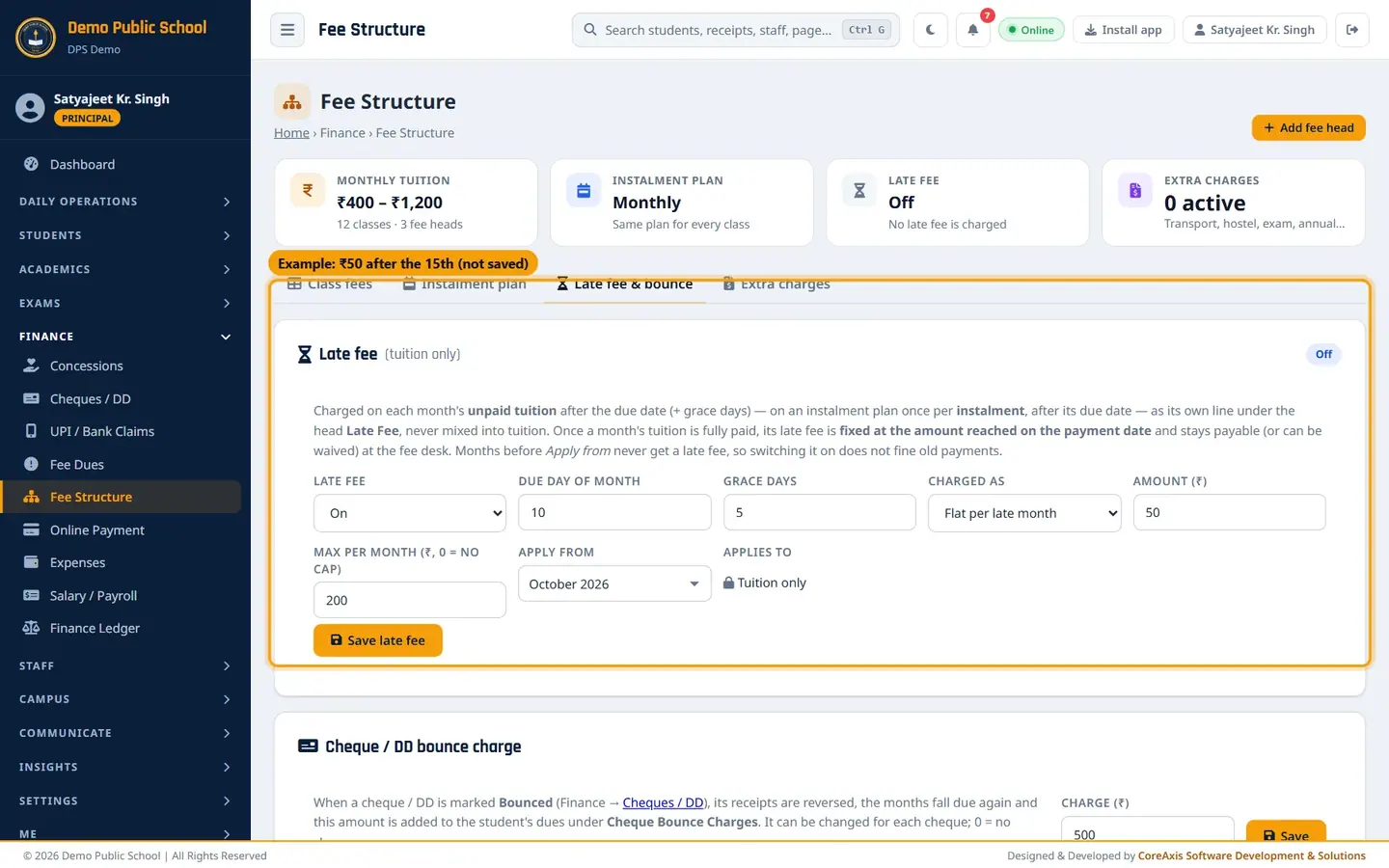
Example late-fee rule (not saved in the demo school). Click Save late fee and confirm. Every student's late-fee lines are recalculated.
TipThe late fee is charged on tuition only, as its own Late Fee line. Months before Apply from never get a late fee. Admin can waive a late fee at the Fee Desk.
Cheque bounce charge
On the Late fee & bounce tab, find Cheque / DD bounce charge.
Type the Charge (₹) (₹500 in the demo school; 0 = no charge) and click Save.
The office can still change the charge for a single cheque when it records the bounce.
Add an extra charge (example: Half-Yearly Exam Fee ₹300 for Class V in November)
Open the Extra charges tab and click Add charge.

Extra charges list (empty in the demo school). Type Charge name
Half-Yearly Exam Fee.In Paid under head, choose an existing head or — New head — and type
Exam Feein New head name.Set Charge to A class and choose Class V. Other choices: All students, One student (admission no.), a transport route (fixed amount or each student's route fare) or hostel students (room fee).
Type Amount (₹)
300, set Billed to Once and In month to November. For a monthly charge choose Every month with a first and last month.
The filled Add charge form. Click Save charge and confirm. Each student of Class V gets a ₹300 line in November under Exam Fee.
TipUse the pause icon to stop billing a charge from this month; months already billed stay. Payments under tuition never reduce an extra charge, and the other way round.
Questions
Can an accountant change the fee structure?
No. Accountants can view it. Only the Principal or an Admin can save changes.
We raised the tuition from October. Will April–September change?
No. Months already billed keep their price. New months use the new amount.
How is transport fee billed?
Add an extra charge with Charge to = Transport route and Amount = Each student's route fare. It is billed monthly to students assigned to a route.
Why do the Fee Desk and Fee Structure show the same heads?
They share one list. A head added here is added to the Fee Desk's Fee head list at once, so any head you bill can also be collected.