 CoreAxis School ERP
Finance · Chapter 27
Cheques / DD
A cheque or DD receipt counts as paid as soon as it is made at the Fee Desk and is printed "Subject to realisation". This page lists those receipts so the office can match them with the bank statement. Mark each one Cleared when the money arrives, or Bounced when the bank returns it.

Screen at a glance
- Waiting for the bank
- Cheques / DDs not yet cleared and their total.
- Pending 7+ days
- Cheques waiting more than a week. Check them with the bank.
- Cleared this month
- Amount and number of cheques cleared this month.
- Bounced this month
- Number of bounced cheques and the amount reversed.
- Tabs
- Pending, Cleared, Bounced, All.
- Search
- Find by cheque no., student, receipt or bank.
- Columns
- Received (date and days waiting), Student, Cheque / DD (number and date), Bank, Amount, Receipt (+n means one cheque paid several receipts), Status, Actions.
- Cleared
- Marks the cheque as paid by the bank.
- Bounced
- Opens the bounce form. It is also shown on cleared cheques, in case the bank returns a cheque later.
Mark a cheque cleared (example: Ishaan Kumar, Class IV-A, cheque 482115, ₹2,400)
Open Cheques / DD. The Pending tab lists cheques waiting for the bank, oldest at the bottom.
Two cheques waiting: Atharv Chauhan (0 days) and Ishaan Kumar (6 days). Find cheque 482115 of Ishaan Kumar in your bank statement (₹2,400, State Bank of India).
Click Cleared on that row.

Cleared button on the row. Check the popup "Mark Cheque 482115 of ₹2,400.00 as cleared by the bank?" and click Yes, cleared.

Confirm the clearance. The message says the cheque was marked cleared (4 receipts). It moves to the Cleared tab.
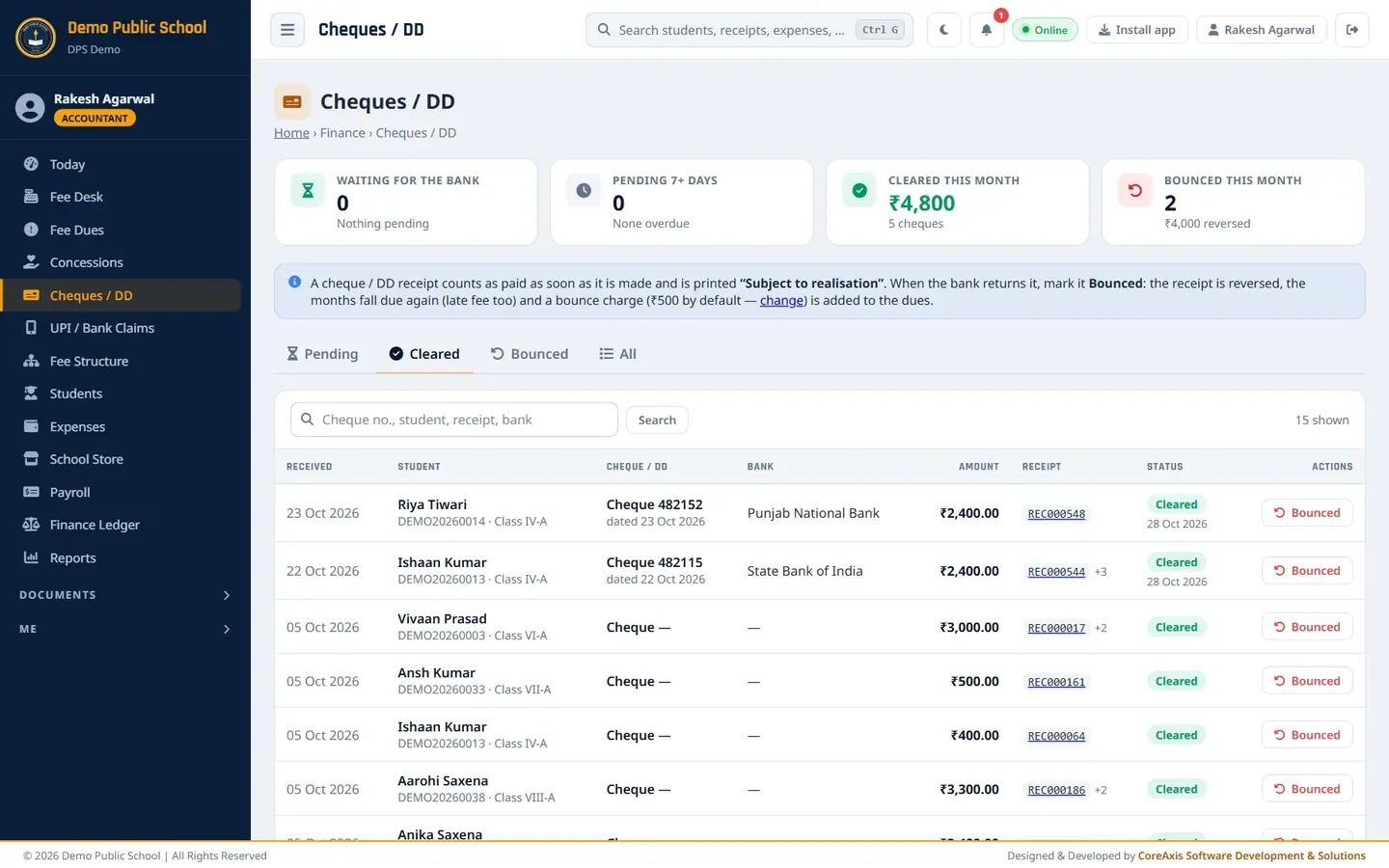
Cleared tab with the date of clearing.
Record a bounced cheque (example: Atharv Chauhan, Class IV-A, cheque 517342, ₹1,600)
When the bank returns the cheque, open Cheques / DD › Pending and click Bounced on Atharv Chauhan's row.
Choose Reason the bank gave: Insufficient funds. Other choices are Signature mismatch, Payment stopped by drawer, Account closed, Cheque stale / post-dated, Amount in words and figures differ, Other.
Check Bounce charge (₹). It is filled with the school's default (₹500). Change it for this cheque if needed, or type 0 for no charge.
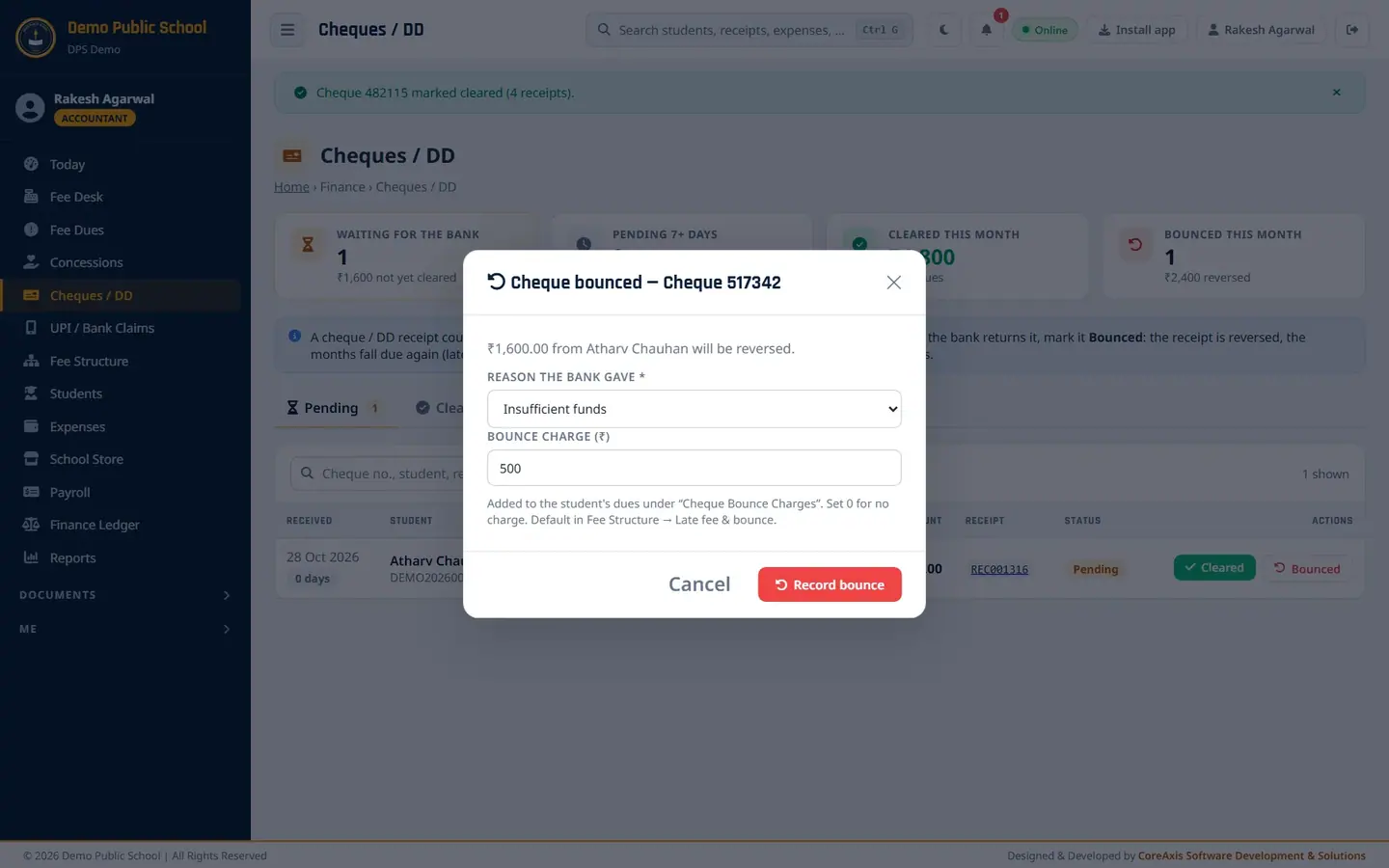
The bounce form shows the amount that will be reversed. Click Record bounce, then Yes, bounced.
A second popup asks "Are you absolutely sure?". Click Yes, proceed.

Bouncing asks twice because it cannot be reversed. Open the Bounced tab. The cheque shows the date and reason.

Bounced cheques with reason.
ImportantRecording a bounce cannot be reversed. Make sure the bank has really returned the cheque.
What a bounce does to the student's dues
The receipt (REC001316) is reversed with a minus receipt (REV-REC001316). The receipt is printed as CANCELLED.
The months it paid (September and October) fall due again, with late fee if the late fee is on.
The bounce charge (₹500) is added under Cheque Bounce Charges. On the Fee Desk, Atharv's card now shows balance ₹1,600 plus Cheque bounce: Cheque 517342 · ₹500, total ₹2,100.

Atharv Chauhan's dues after the bounce. Collect the new payment (cash or another cheque) at the Fee Desk as usual.
Questions
Where do I change the default bounce charge?
Fee Structure › Late fee & bounce › Cheque / DD bounce charge (Admin / Principal).
Can I delete a cheque receipt instead of bouncing it?
No. Always use Bounced, so the reversal, the reason and the charge are recorded.
A cheque was cleared but the bank returned it a week later.
Open the Cleared tab and click Bounced on that cheque.