 CoreAxis School ERP
Finance · Chapter 24
Fee Desk
The Fee Desk is the counter screen of the school office. You search a student, the dues appear with the amount filled in, and one click makes a numbered receipt. Every receipt updates Fee Dues, the Finance Ledger (Cash Book or Bank Book) and the parent portal at once. Cheques collected here wait in Cheques / DD until the bank clears them.
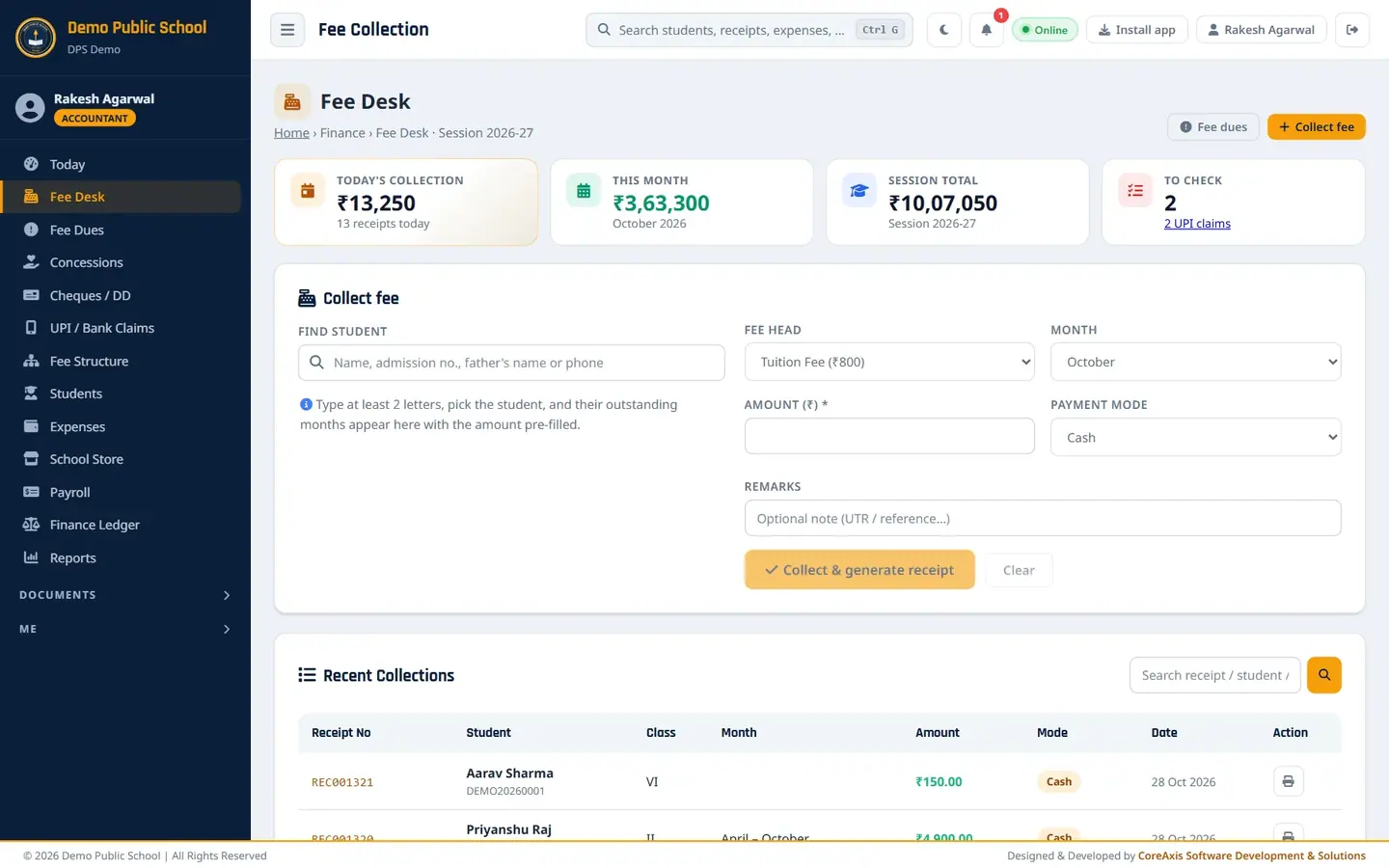
Screen at a glance
The top row has four cards (KPIs). Below them is the Collect fee panel, and at the bottom the Recent Collections list.
- Today's collection
- Money received today and the number of receipts made today. Click it to open today's entries in the Finance Ledger.
- This month
- Total collected in the current calendar month (for example October 2026). Click it to open the Finance Ledger overview.
- Session total
- Total collected in the running academic session (2026-27).
- To check
- Cheques waiting for the bank plus UPI / bank claims waiting to be verified, for example "1 cheque · 3 UPI claims". Each part is a link to Cheques / DD or UPI / Bank Claims.
- Fee dues (button)
- Opens the Fee Dues list of students who owe fees.
- Collect fee (button)
- Jumps to the Collect fee panel and puts the cursor in Find student.
- Find student
- Type at least 2 letters of the name, admission no., father's name or phone. Pick the student from the list.
- Fee head
- The head the money is booked under. Tuition Fee is selected by default. The list holds every fee head of the school: the heads set in Fee Structure (Annual Charges, Examination Fee …), the other heads (Admission Fee, Sports Fee, Computer Fee …) and charges such as Exam Form Fee, Cheque Bounce Charges and School Store. Choose another head to pay a separate charge.
- Month
- The month the receipt is recorded against. It is set for you when you tap a month or All.
- Amount (₹)
- Filled in from the dues. You can change it (part payment or advance).
- Payment mode
- Cash, Online (UPI, NEFT, card swipe), Cheque or DD. Cheque and DD show three more boxes: Cheque no., Cheque date and Bank.
- Remarks
- Optional note printed on the receipt, for example the UPI UTR number.
- Collect & generate receipt
- Saves the payment. The button shows the amount, for example "Collect ₹2,000 & generate receipt".
- Clear
- Empties the form to start with another student.
- Recent Collections
- Latest receipts with Receipt No, Student, Class, Month, Amount, Mode and Date. For a payment that covers several months, Month shows the range (for example August – October). Search by receipt no., name or admission no. The printer icon opens the receipt. Admin / Principal also see a red bin icon to delete a receipt.
Read a student's dues (example: Harshit Kashyap, Class III-A)
Before taking money, look at the student card. It tells you what is billed, what is paid and what is still due.
Open Fee Desk from the menu.
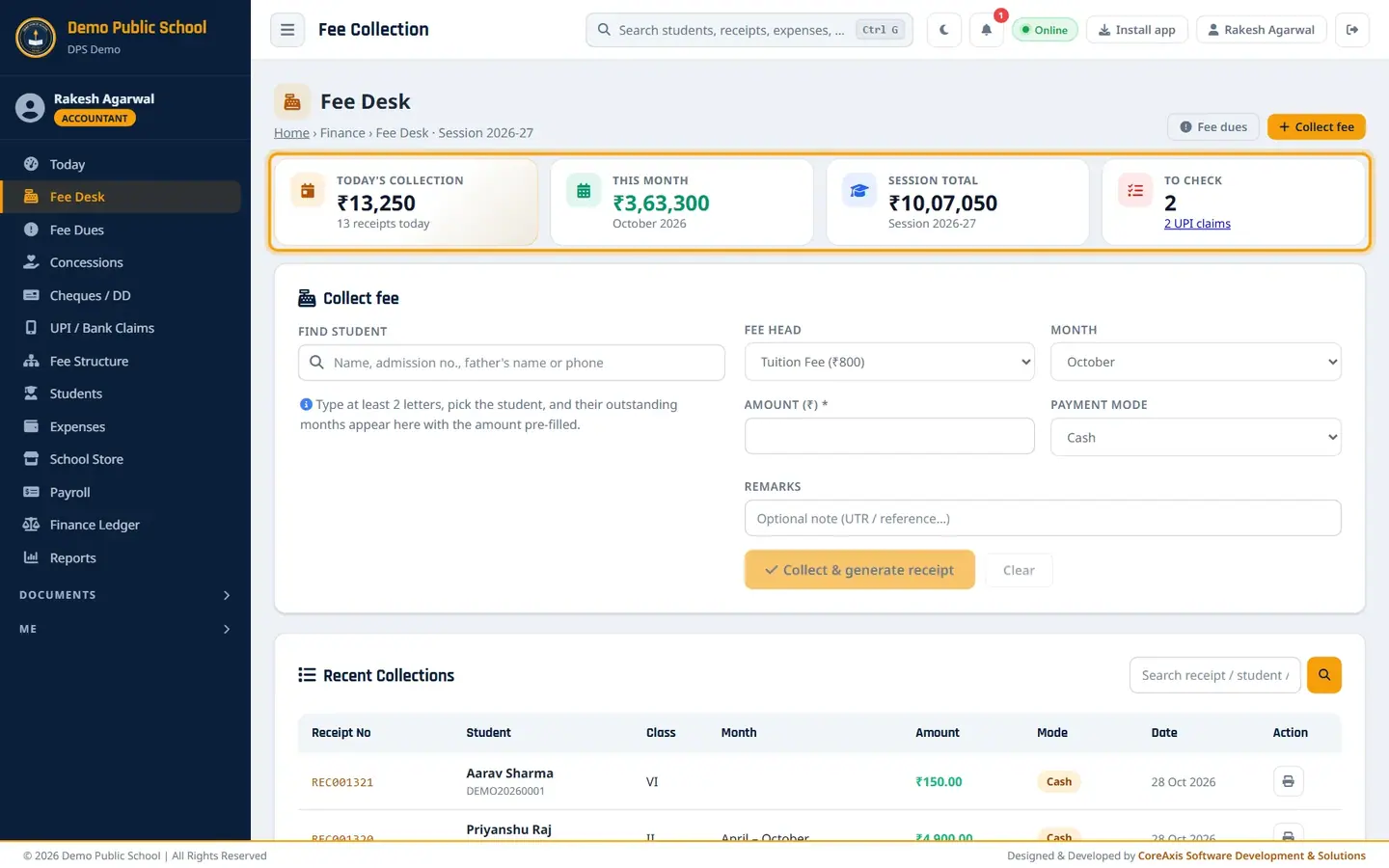
The Fee Desk with the four KPI cards on top. Click in Find student and type part of the name, for example
Harshit Kas. Two students with this name appear: one in Class II and one in Class III. Check the class and the father's name, then pick Harshit Kashyap · DPSDEMO20260073 (Class III).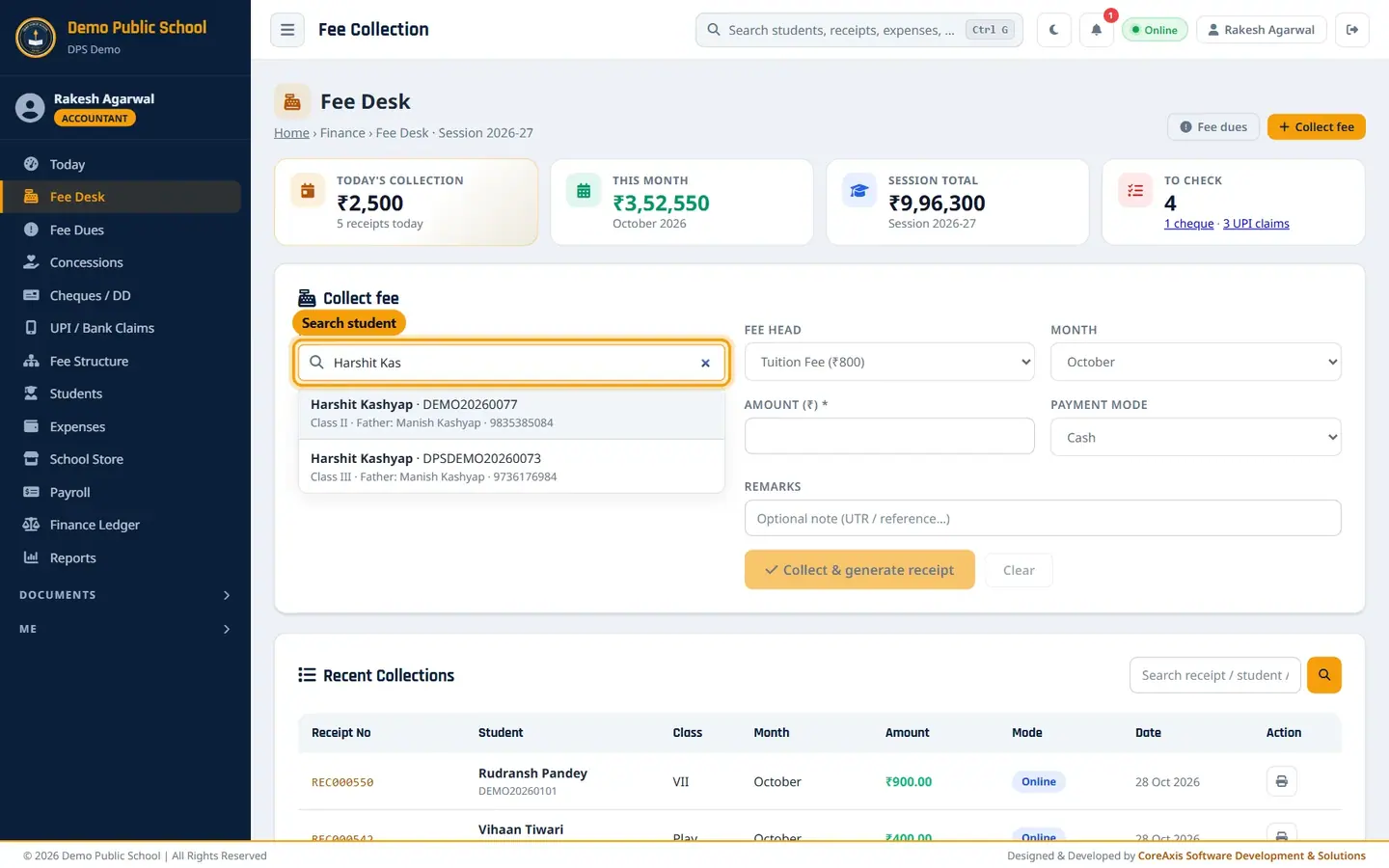
The list shows class, father's name and phone so you pick the right child. Read the card. Billed ₹5,600 is the tuition billed up to October (7 months × ₹800). Paid ₹3,600 is what the family has paid. Balance ₹2,000 is still due.
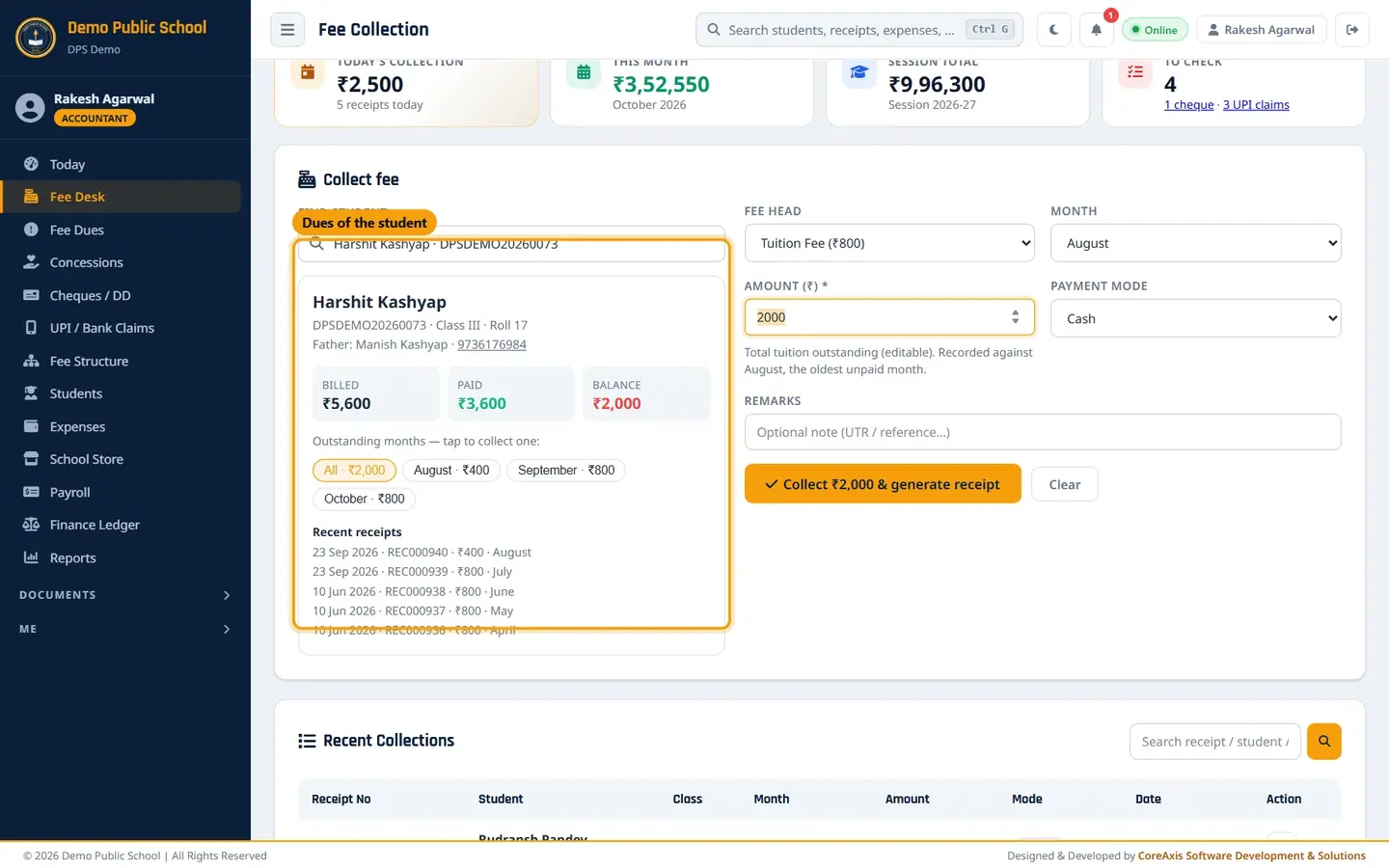
Student card: billed, paid, balance and the unpaid months. Look at Outstanding months. Each unpaid month is a chip with its amount: August ₹400 (part paid earlier), September ₹800, October ₹800. All · ₹2,000 is the total.
Look at Recent receipts at the bottom of the card to see the family's last payments and their receipt numbers.
TipIf the student also owes other charges (exam fee, transport, cheque bounce charge, late fee), they show under Other charges & late fee with their own chips. See the example of Shaurya Dubey below.
TipIf the student has a concession, a green line Concession this session shows the amount and the rule, for example Kabir Sharma (Class V-A): "Staff ward · 50% of tuition · Apr–Mar".
TipA green line Tuition paid in advance means the family has paid more than billed so far.
Collect a fee in cash (example: Harshit Kashyap, Class III-A, ₹2,000 for August–October)
Search and pick Harshit Kashyap (Class III) as shown above.
Leave the All · ₹2,000 chip selected. Amount (₹) shows 2000 and the note says it is recorded against August, the oldest unpaid month. The money settles the oldest month first.
Keep Payment mode as Cash.
Type a note in Remarks if needed, for example
Paid by father at the counter.
Amount, payment mode and the Collect button. Click Collect ₹2,000 & generate receipt.
The app asks "Do you want to continue with Collect ₹2,000 & generate receipt?". Check the amount and click Confirm.
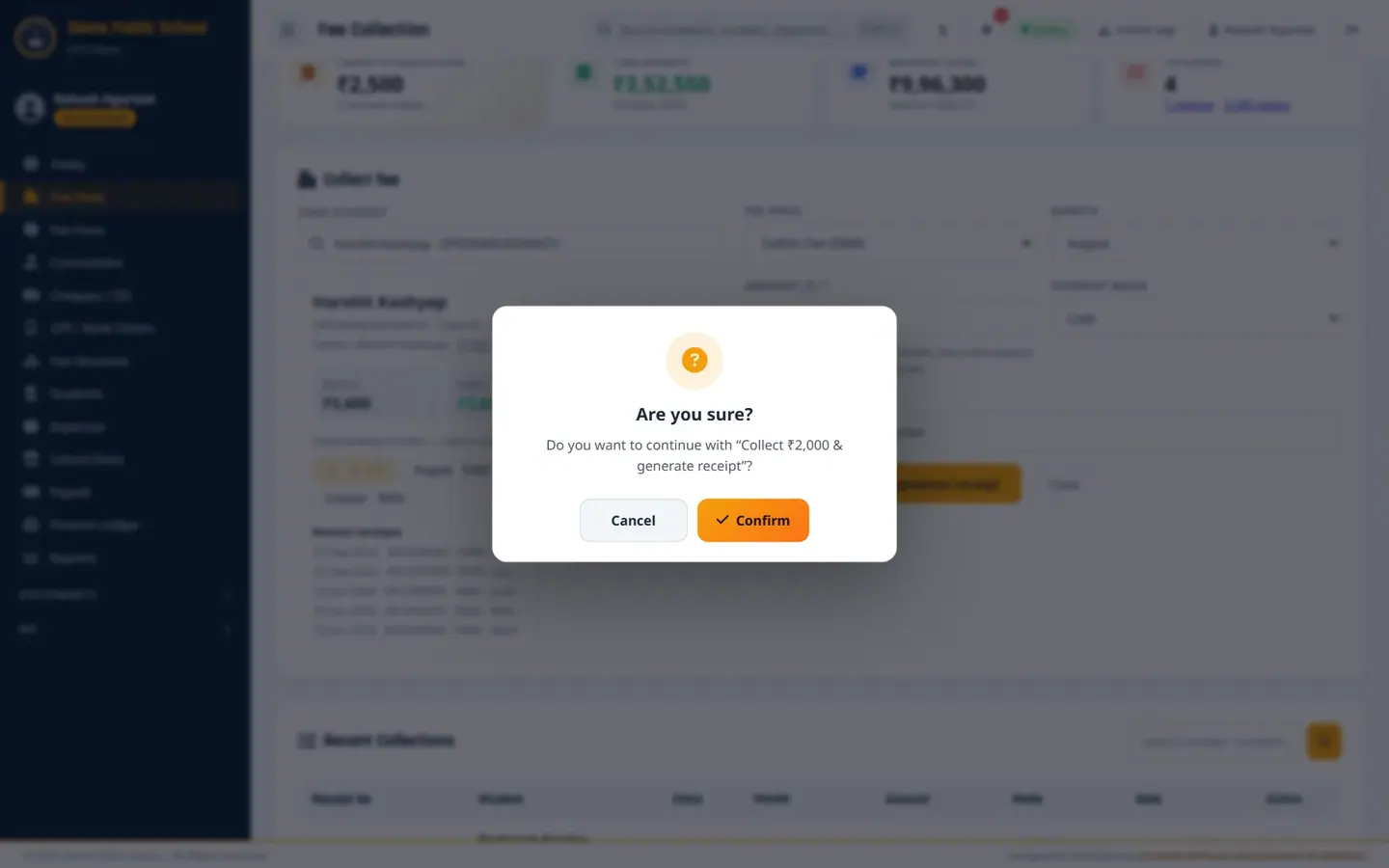
Every save asks once more. Click Cancel if the amount is wrong. A green bar shows Receipt REC001314 saved for ₹2,000.00. Today's collection goes up at once.
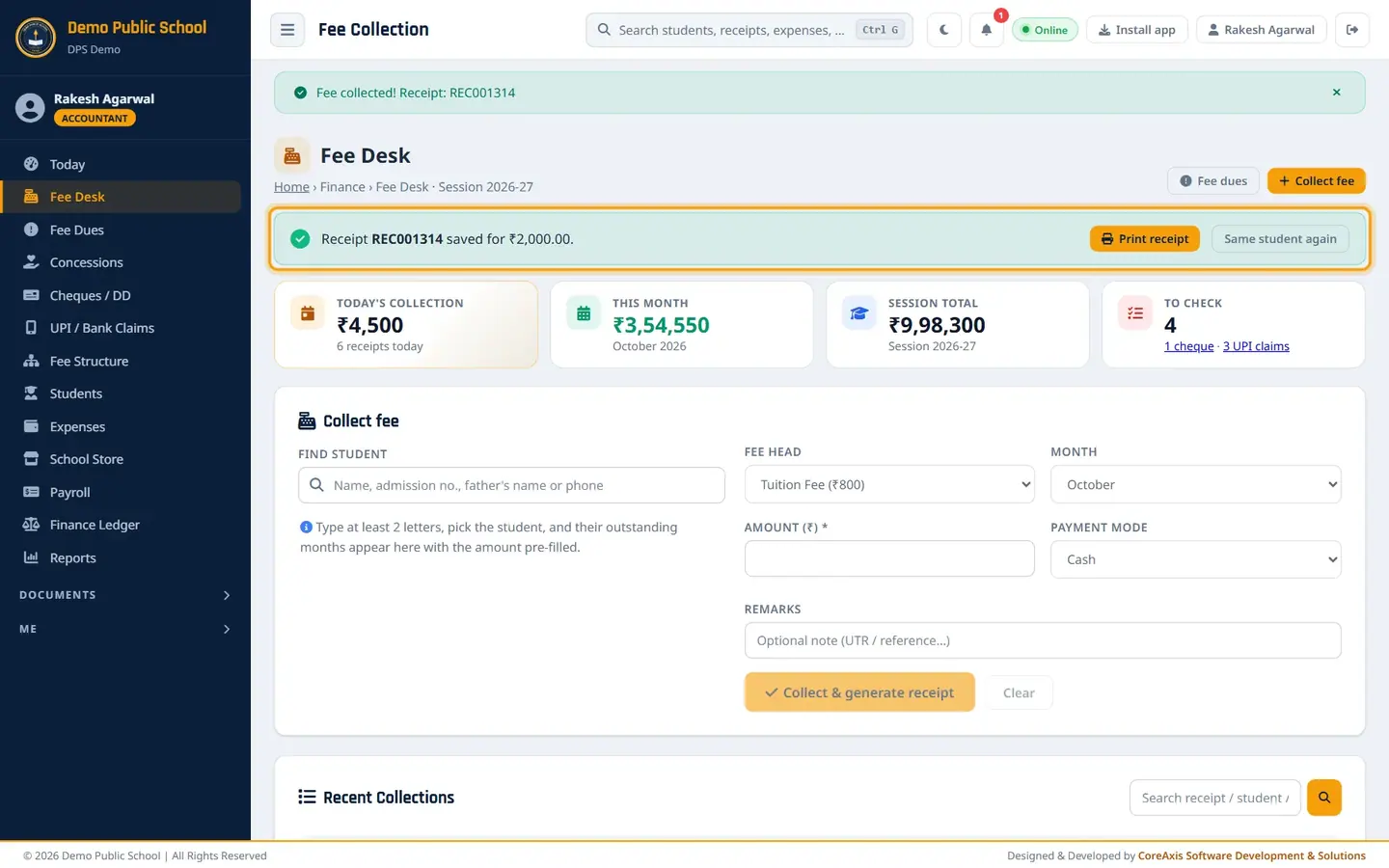
The new receipt number with Print receipt and Same student again. Click Print receipt to open the receipt, or Same student again to take another payment from the same family.
TipTo collect one month only, tap its chip (for example September · ₹800) instead of All.
TipIf the parent pays more than the balance, the extra is kept as Tuition paid in advance and used for the next months.
The receipt: view, print and PDF (example: REC001314)
Click Print receipt in the green bar, or the printer icon in Recent Collections. The receipt opens in a new tab.

Office copy and Student copy on one A4 sheet. REC001314 covers three months, so the Month column shows August – October with the split Aug 400 · Sep 800 · Oct 800. Choose a look in Design: 1 · Classic, 2 · Modern, 3 · Minimal (black & white), 4 · Royal, 5 · Compact, or Thermal 80 mm / Thermal 58 mm for a roll printer.
Choose Office + Student (A4) for two copies on one sheet, or Single copy.
Click Print to print. To keep the receipt as a file or send it on WhatsApp / email, click ⬇ PDF. The PDF downloads; it is the same file the parent gets in the portal and the app.
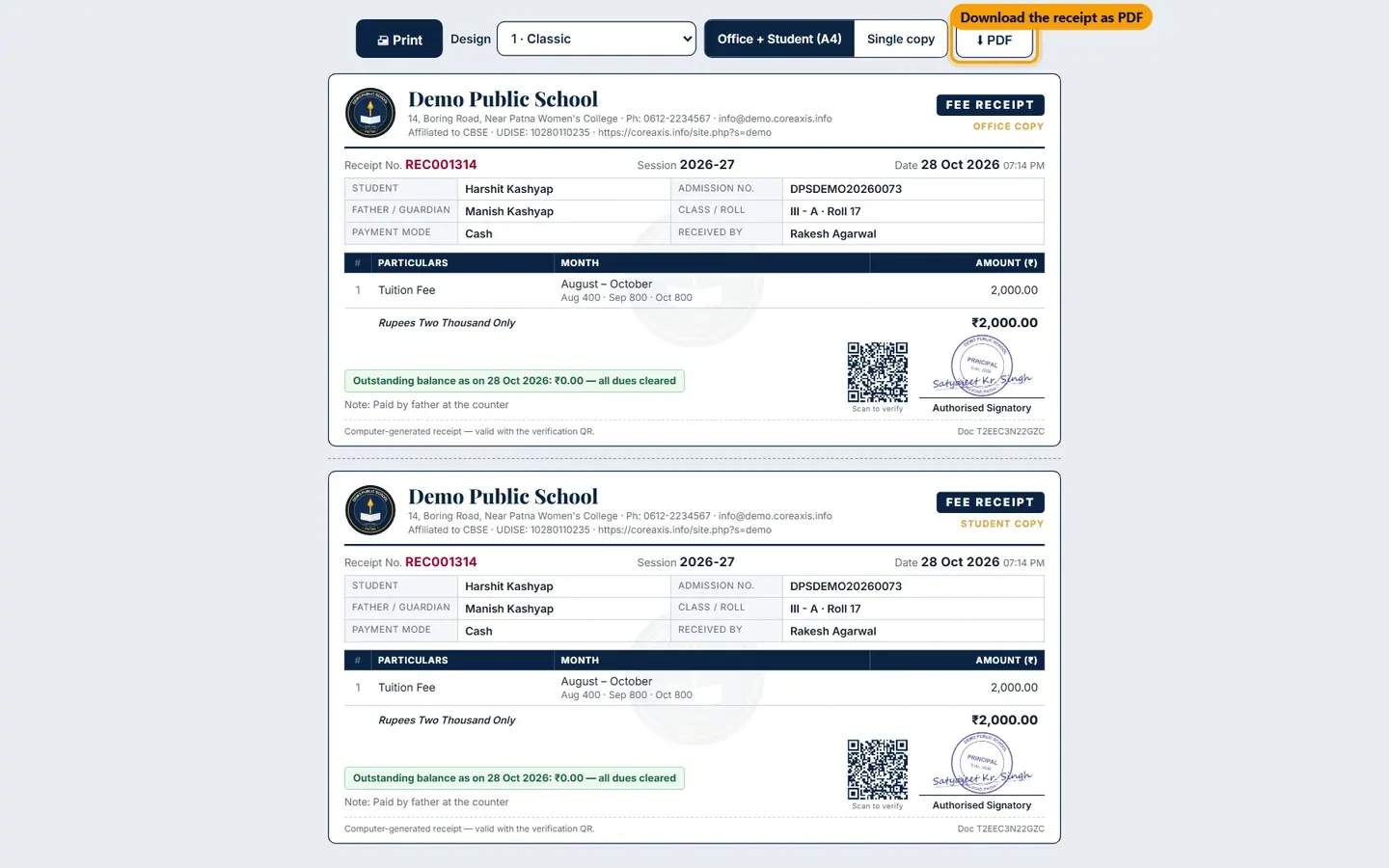
The ⬇ PDF button next to Print, Design and the copy choice. Check the green line Outstanding balance as on … on the receipt. It tells the parent what is still due after this payment.
TipThe first office print is the ORIGINAL. Every later print is stamped DUPLICATE COPY – n and is logged in the Document Register.
TipParents see the same receipt in the parent portal and the app, where it has a Download PDF button. That copy is marked as a digital copy.
TipThe QR code on the receipt lets anyone check that the receipt is genuine.
Collect by UPI (example: Dhruv Srivastava, Class V-A, October ₹900)
Use this when the parent pays at the counter by scanning the school's UPI QR (demopublicschool@sbi) and shows you the success screen. If the parent pays from home and sends the UTR, use UPI / Bank Claims instead.
Search and pick Dhruv Srivastava · DEMO20260025 (Class V).
Tap the October · ₹900 chip. The month changes to October and the amount to 900.
Set Payment mode to Online.
Type the UTR from the parent's phone in Remarks, for example
UPI UTR 430218765412 (PhonePe).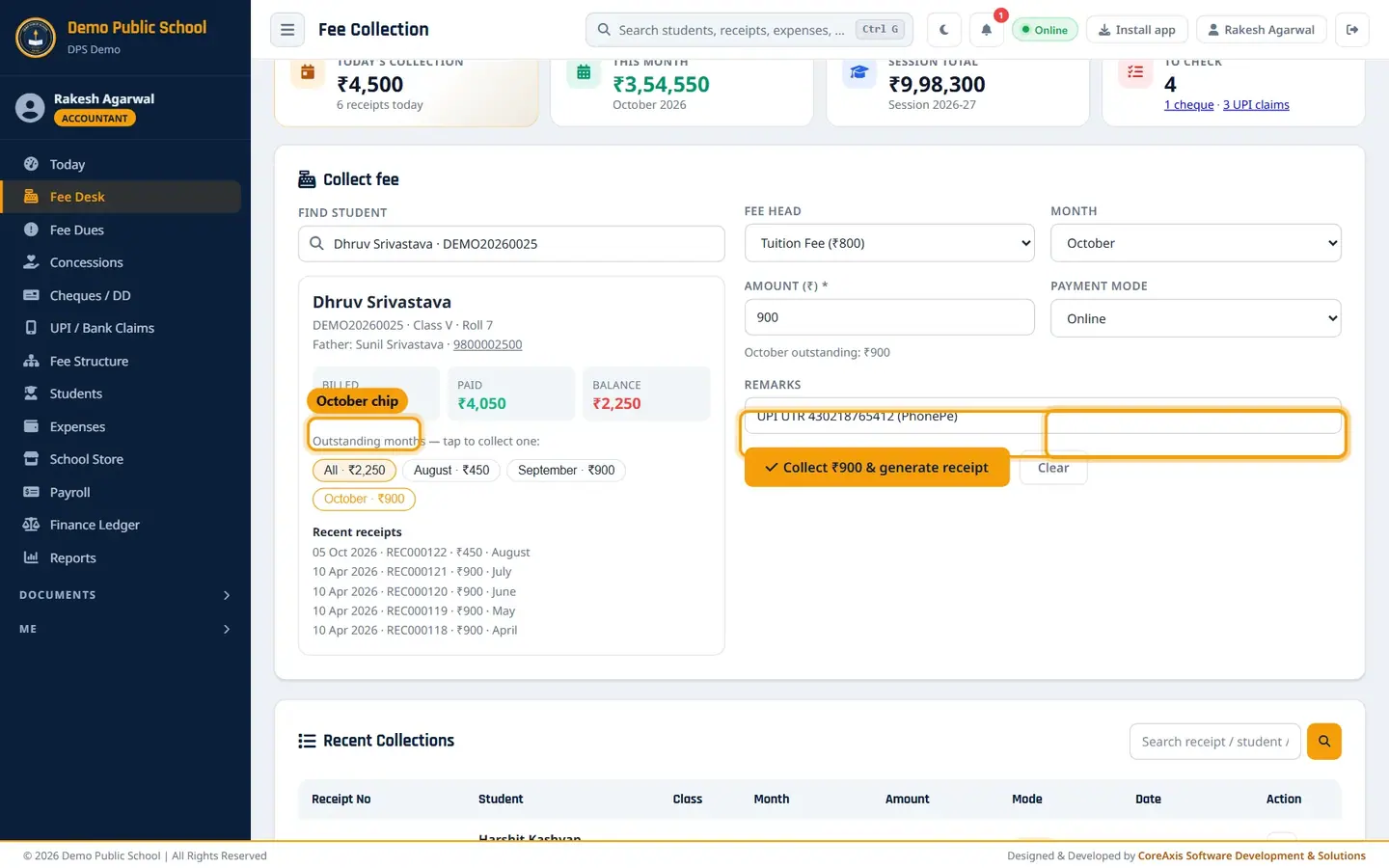
October chip selected, mode Online and the UTR in Remarks. Click Collect ₹900 & generate receipt, then Confirm.
Receipt REC001315 is saved. Online receipts go to the Bank Book in the Finance Ledger.
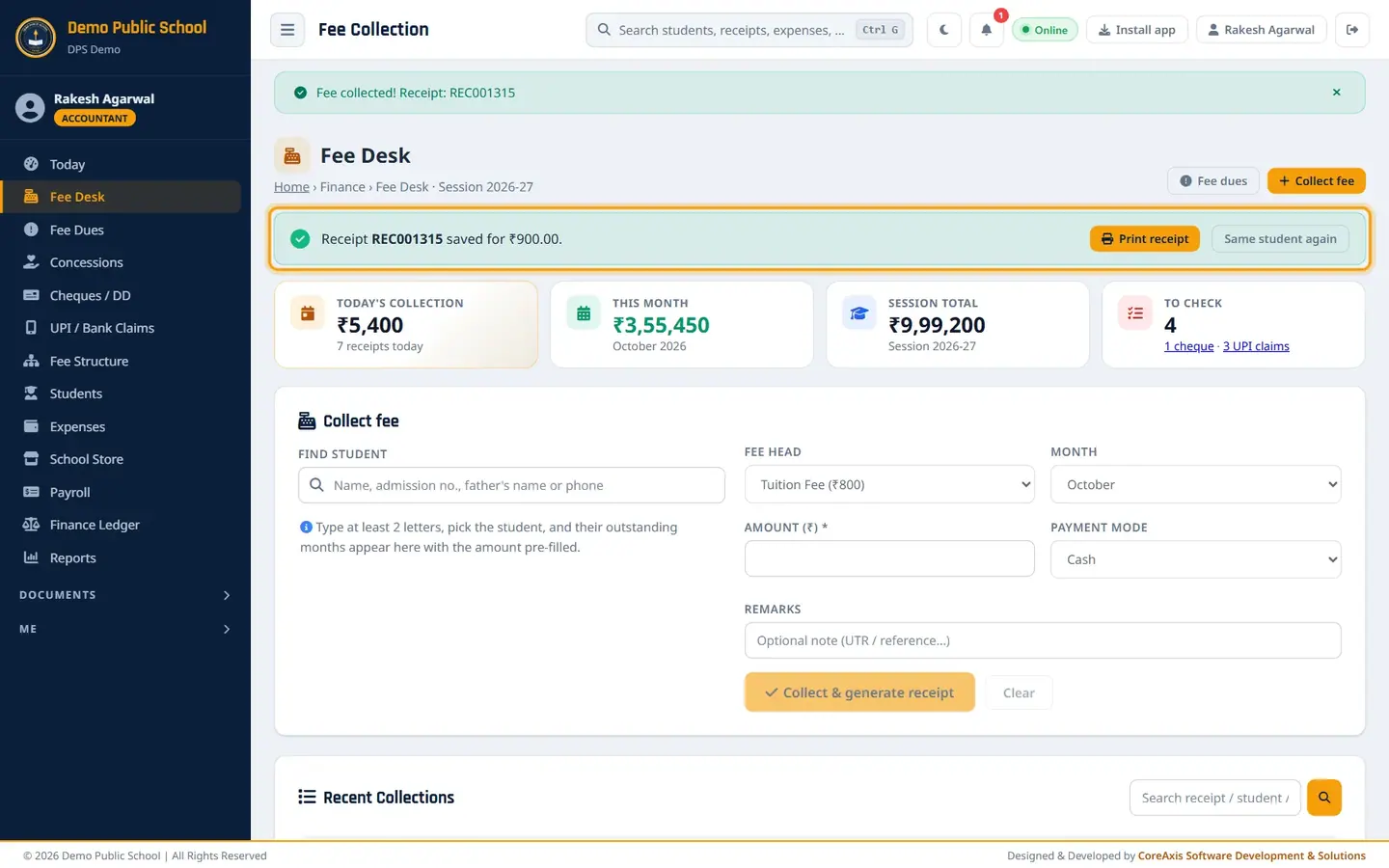
UPI receipt saved.
TipAlways check the money has reached the school account (SMS or bank app) before you make an Online receipt.
Collect by cheque (example: Atharv Chauhan, Class IV-A, ₹1,600 by cheque 517342)
Search and pick Atharv Chauhan · DEMO20260017 (Class IV). The balance is ₹1,600 (September and October).
Leave All · ₹1,600 selected.
Set Payment mode to Cheque. Three more boxes appear.
Type Cheque no.
517342, set Cheque date to 28-10-2026 and choose BankPunjab National Bank(start typing to pick from the list).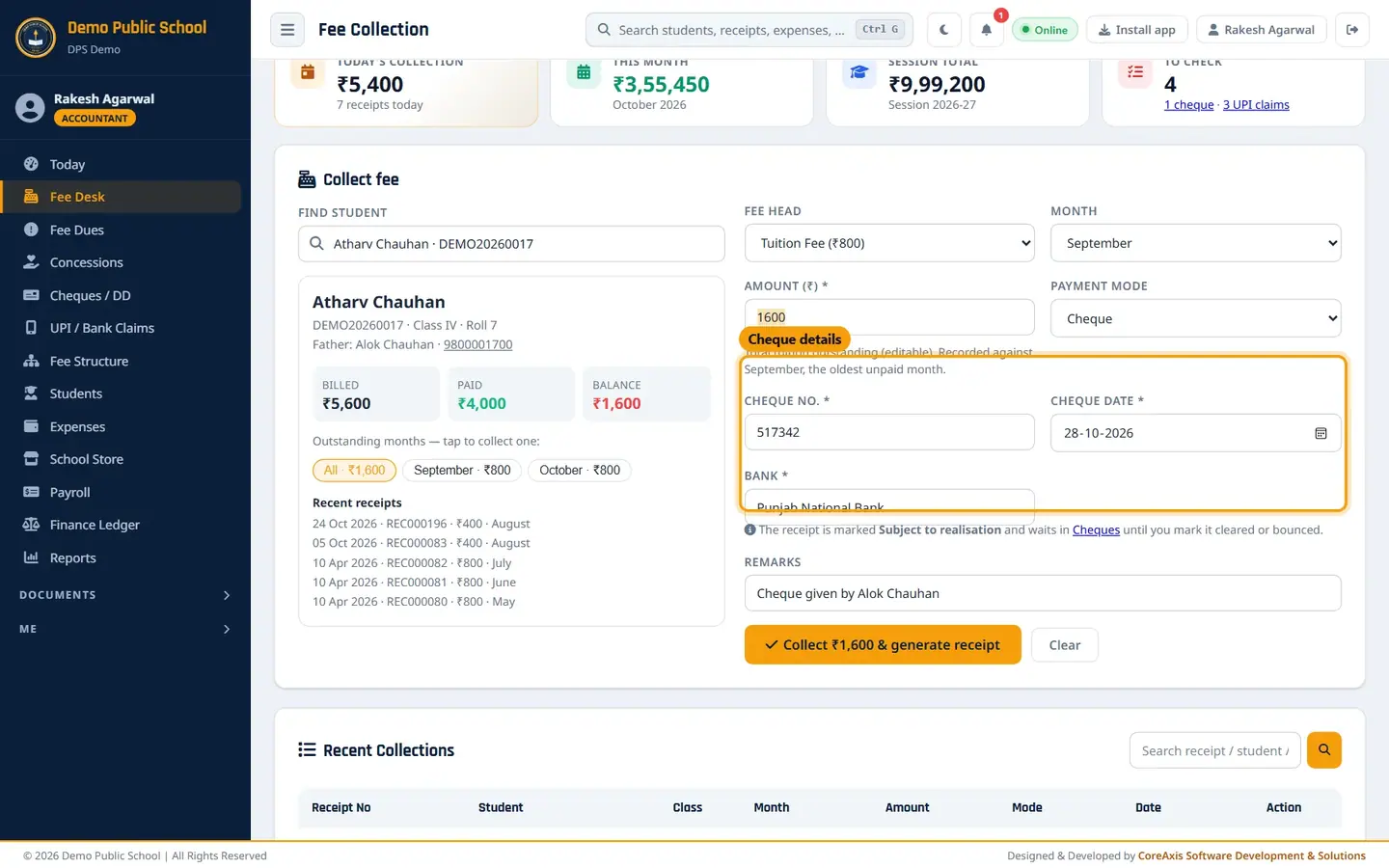
Cheque no., Cheque date and Bank are required for a cheque or DD. Add a note in Remarks if you like, for example
Cheque given by Alok Chauhan.Click Collect ₹1,600 & generate receipt, then Confirm. Receipt REC001316 is saved.
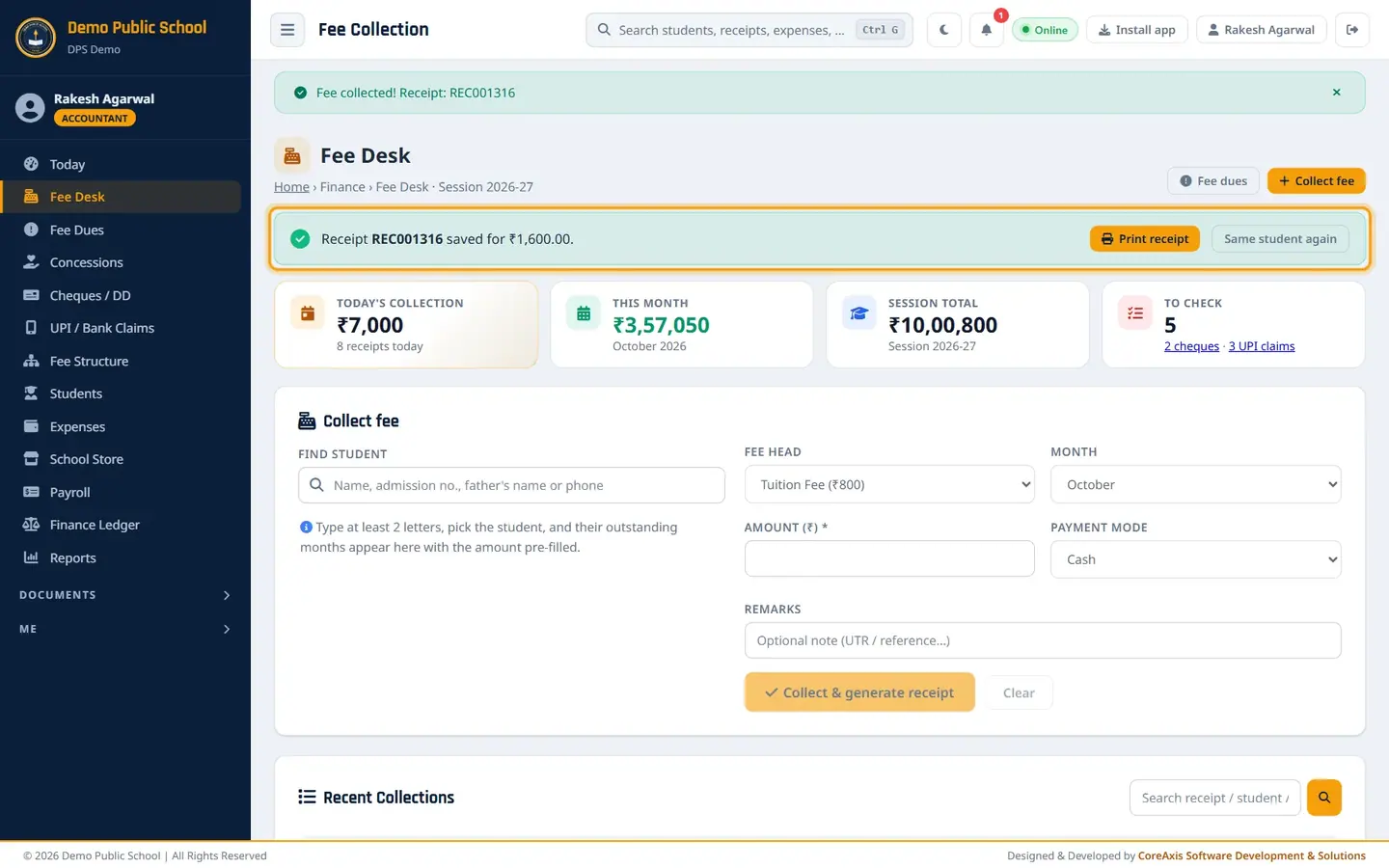
The To check card now counts the new cheque. Open the receipt. It shows the cheque details and SUBJECT TO REALISATION.
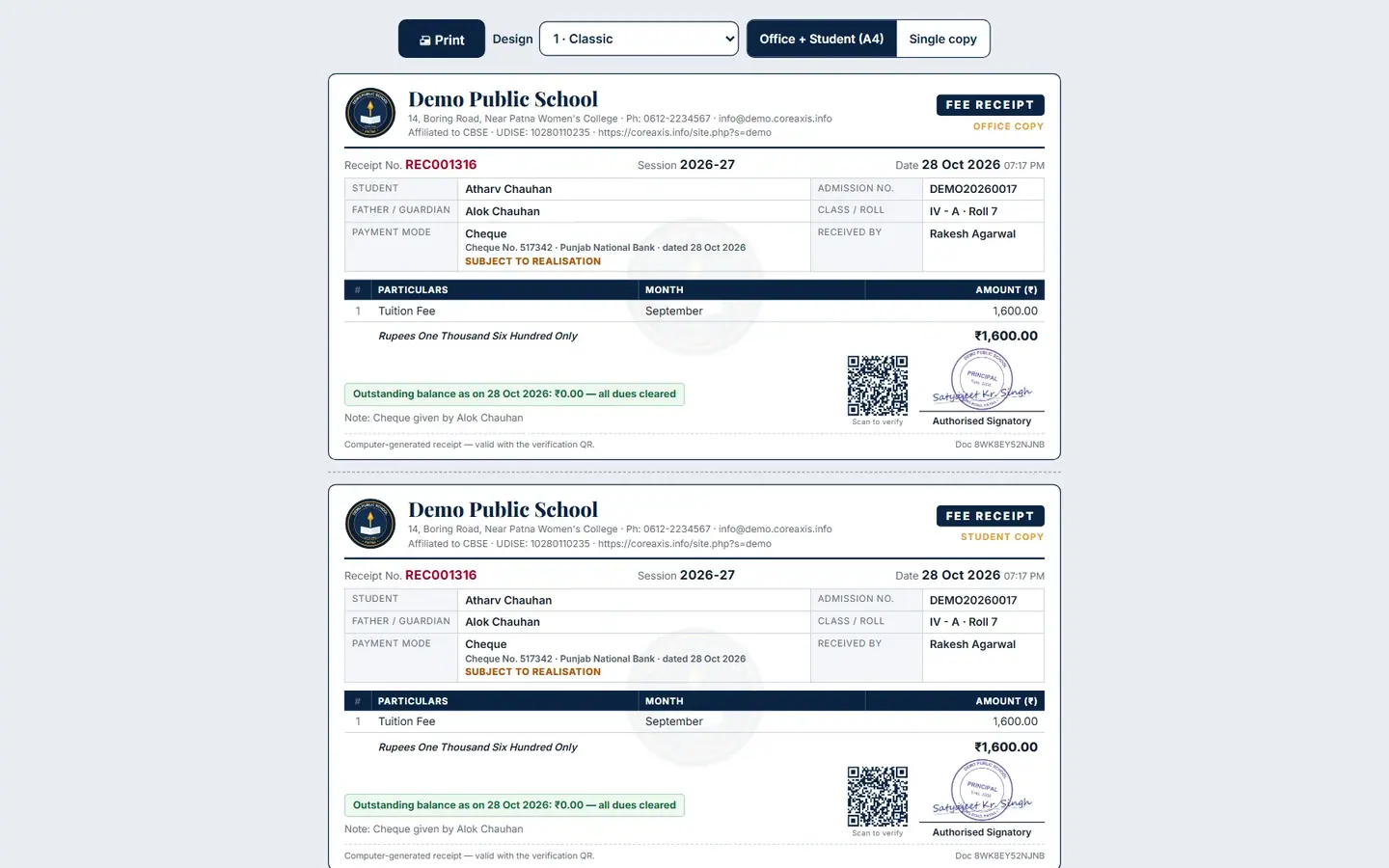
A cheque receipt is valid only after the bank clears the cheque. When the bank statement shows the cheque, mark it Cleared in Cheques / DD. If it comes back unpaid, mark it Bounced (see the Cheques / DD chapter).
TipChoose DD for a demand draft. The boxes change to DD no. and DD date.
Take a part payment (example: Aanya Kumar, Class IV-A, pays ₹1,000 of ₹2,000)
Search and pick Aanya Kumar · DPSDEMO20260088 (Class IV). The balance is ₹2,000.
Leave All selected and change Amount (₹) from 2000 to
1000.Keep Cash and write in Remarks
Part payment - balance promised by 10 Nov.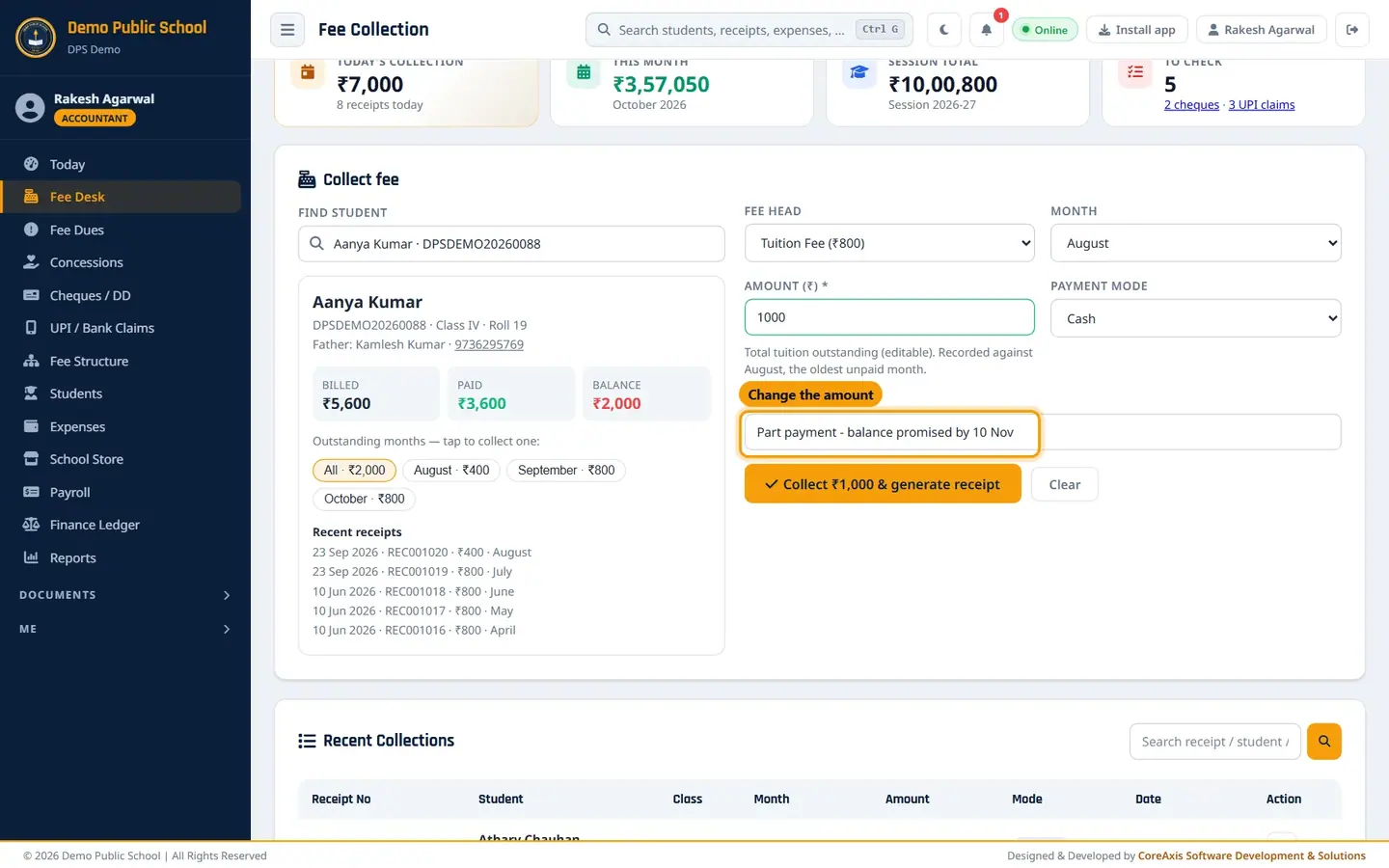
Change the amount for a part payment. Click Collect ₹1,000 & generate receipt, then Confirm. Receipt REC001317 is saved.
Search the student again. The balance is now ₹1,000: September ₹200 and October ₹800. The ₹1,000 cleared the oldest month first.

After the part payment only ₹1,000 is still due.
TipThe receipt prints the new outstanding balance, so the parent knows what is left.
Other charges, late fee and concessions on the card (examples: Shaurya Dubey, Kabir Sharma)
The card shows everything a student owes, not only tuition.
Shaurya Dubey (Class IV-A) has paid all tuition, but his cheque 482189 bounced. The card shows Other charges & late fee — ₹300 due with the chip Cheque bounce: Cheque 482189 (REC000549) · ₹300. His recent receipts show the bounced cheque and its reversal in red. Tap the chip to collect the charge: the fee head changes to Cheque Bounce Charges.

A bounce charge listed under Other charges & late fee. Kabir Sharma (Class V-A) is a staff ward. The green line Concession this session: ₹3,150 — Staff ward · 50% of tuition · Apr–Mar shows the concession already taken off the billed tuition. Click manage to open Concessions.

Concession shown on the student card. When the school switches on a late fee (Fee Structure › Late fee & bounce), each late month adds a Late Fee chip under Other charges. In the demo school the late fee is off.
Find an old receipt and what the Admin can do extra
In Recent Collections, type a receipt no., student name or admission no. in the search box and click the search button.
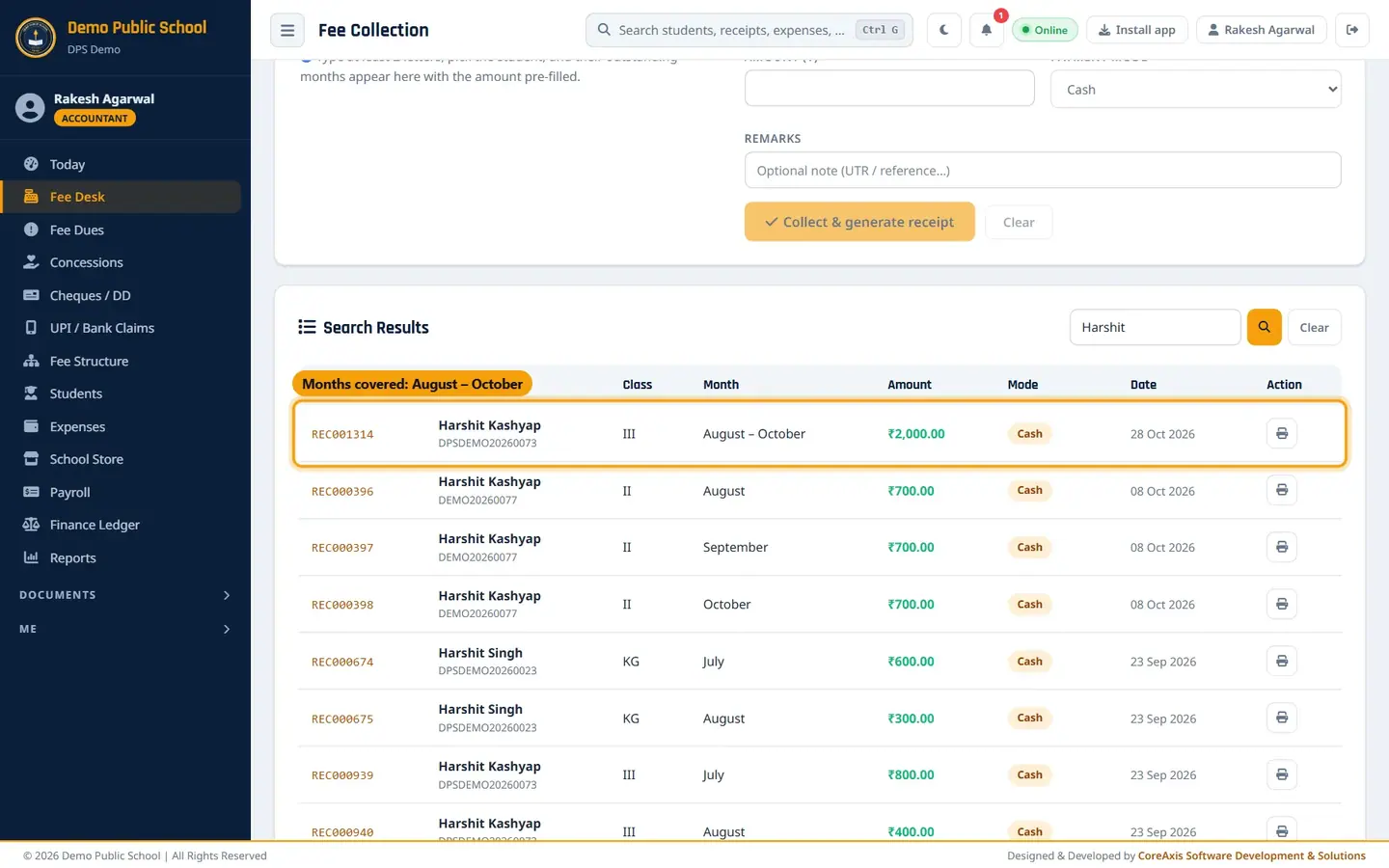
Search results for "Harshit". REC001314 shows the months it covers: August – October. Click the printer icon on a row to open that receipt again (it prints as a DUPLICATE COPY).
Admin and Principal see a red bin icon on each row to delete a wrong receipt, and a Fee Waivers / Concessions panel to waive a billed month with a reason. Accountants do not see these.

Admin view: waiver panel and delete icons.
ImportantDeleting a receipt cannot be reversed and puts the amount back into the student's dues. For a bounced cheque, do not delete the receipt: mark the cheque Bounced in Cheques / DD.
Questions
A parent paid twice by mistake. What do I do?
The second payment is kept as an advance and is used for the next months automatically. If the parent wants the money back, ask the Admin / Principal to delete the extra receipt after you return the cash.
Two students have the same name. How do I pick the right one?
The search list shows the admission no., class, father's name and phone for each student. Check these before you pick.
I collected three months in one payment. What does the receipt show?
One receipt with the month range, for example August – October, and the split per month under it (Aug 400 · Sep 800 · Oct 800). The same range shows in Recent Collections, on the accountant's Today page and in the parent portal. The payment settles the oldest unpaid month first.
Can an accountant delete or edit a receipt?
No. Only Admin / Principal can delete a receipt. An accountant who made a mistake should ask the Admin.
Where does the money go in the accounts?
Cash receipts go to the Cash Book, Online / Cheque / DD receipts to the Bank Book. Both are in Finance Ledger.
How do I collect an exam form fee?
When the office submits an exam form with a fee (Exams › Exam Form Apply), the fee is added to the student's account. At the Fee Desk it shows under Other charges & late fee as "Exam form fee: <exam name>". Tap the chip to collect it; the fee head changes to Exam Form Fee.