 CoreAxis School ERP
Admin & Principal · Chapter 17
Library, School Store, transport and hostel
Two campus desks are in the app. The Library desk (Admin, Principal and teachers with library access) issues and returns books and works offline. The School Store (Admin, Principal and Accountant, when the school has the School Store add-on) sells kits, stationery and uniform to students and adds the amount to the student's fee dues; it works online only. There is no transport or hostel desk in the app for staff: routes, stops, vehicles, hostel rooms and allotments are managed on the website. Parents see their child's library books and hostel room in their own app.
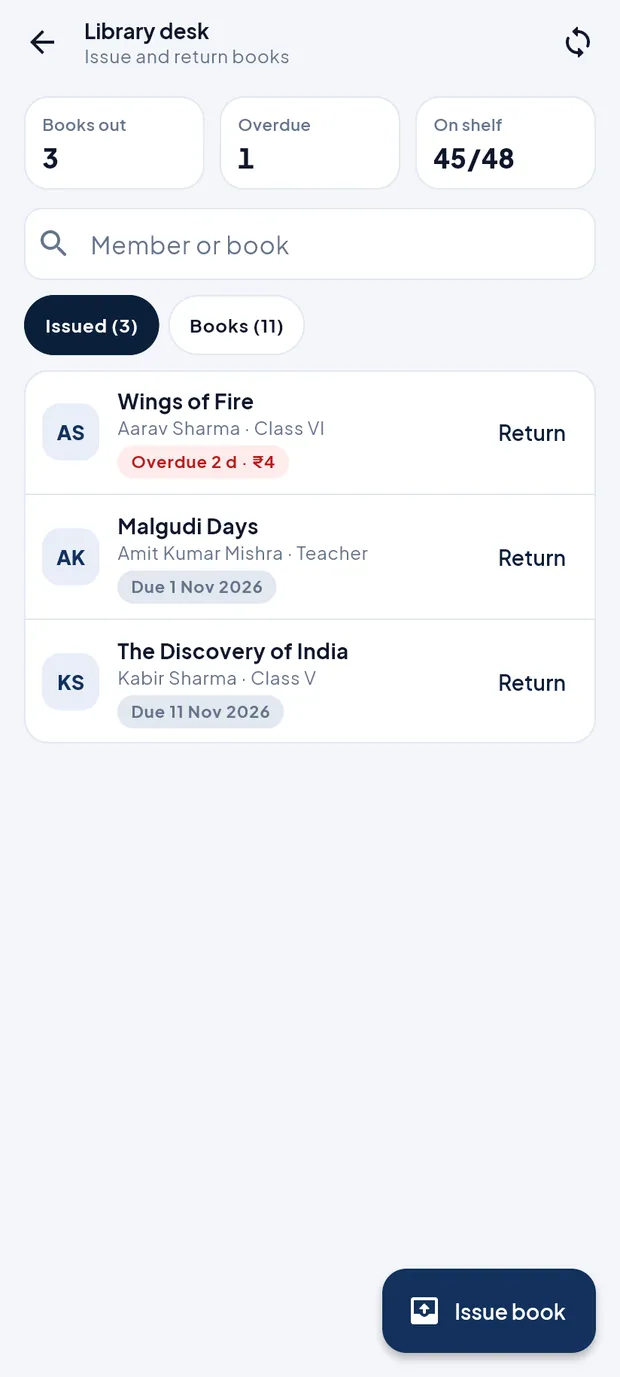
The Library desk at a glance
Open More › Library desk.
Library desk: 3 books out, 1 overdue, 45 of 48 on the shelf.
- Books out / Overdue / On shelf
- Books issued now, how many are past the due date, and copies on the shelf out of all copies.
- Search
- Member or book on the Issued tab; Title, author, ISBN on the Books tab.
- Issued tab
- Each issued book with the borrower, class or role, and a tag: Due 1 Nov 2026, or red Overdue 2 d · ₹4 with the fine so far. Return records the return.
- Books tab
- All books with shelf and copies; All out when no copy is on the shelf. Books are added on the website.
- Issue book
- Opens the issue sheet.
Issue a book (example: Wings of Fire to Aarav Sharma, VI-A)
On the Library desk, tap Issue book.
Tap Book * and choose Wings of Fire.
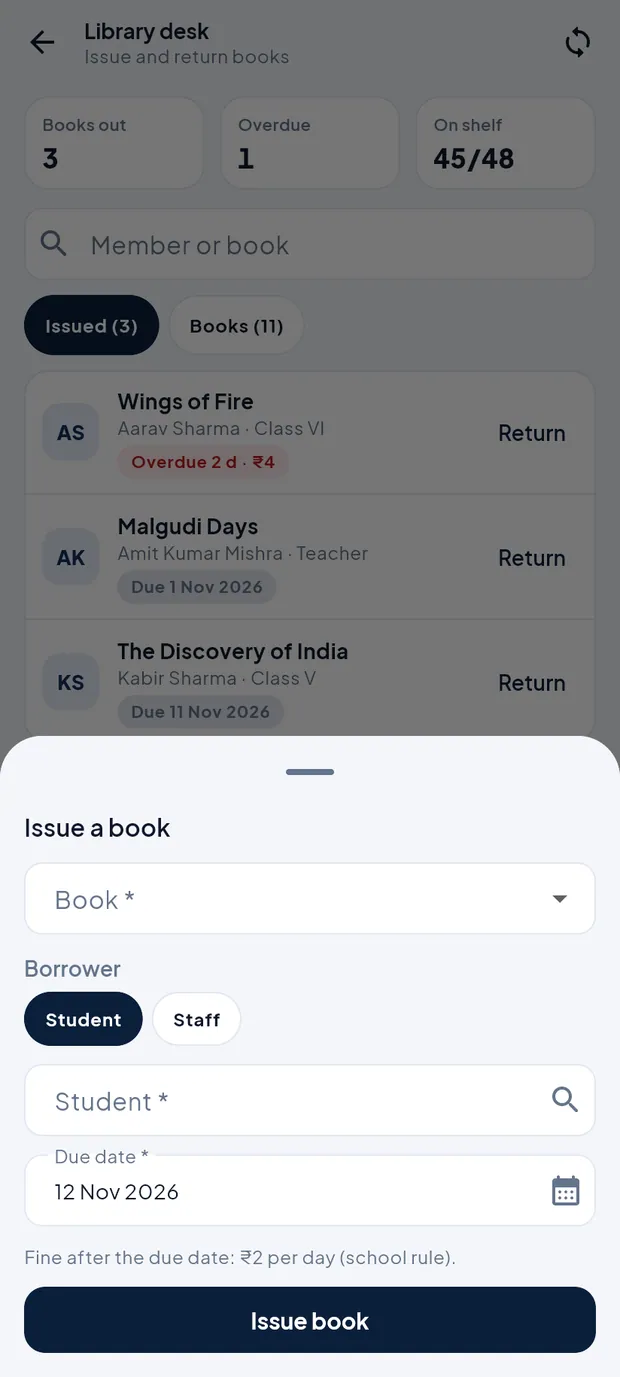
Issue a book sheet. Under Borrower, tap Student (or Staff for a teacher).
Tap Student * and search for Aarav Sharma.
Check the Due date * (14 days from today by default). The sheet shows the fine rule, e.g. Fine after the due date: ₹2 per day (school rule).
Tap Issue book. The app confirms Issued to Aarav Sharma and the book moves to the Issued tab.
TipIssue and return work offline and sync later.
TipIf the list is empty, pull down to download the library the first time.
Return a book (example: Wings of Fire, 2 days late)
On the Issued tab, find the book (search by member or title).
Tap Return. The dialog Return this book? shows how many days it is overdue and the fine, or Returned on time · no fine.
Tap Record return. The app shows Returned · fine ₹4 and the book goes back on the shelf.
TipCollect the fine at the fee desk or as the school decides. Fines and library settings are on the website (Campus › Library).
Sell from the School Store (example: diary and notebook to Aarav Sharma)
The amount of a sale is added to the student's fee dues under School Store. Collect it later with Collect fee.
Open More › School Store. The Sell tab lists kits and items by group with price and stock.
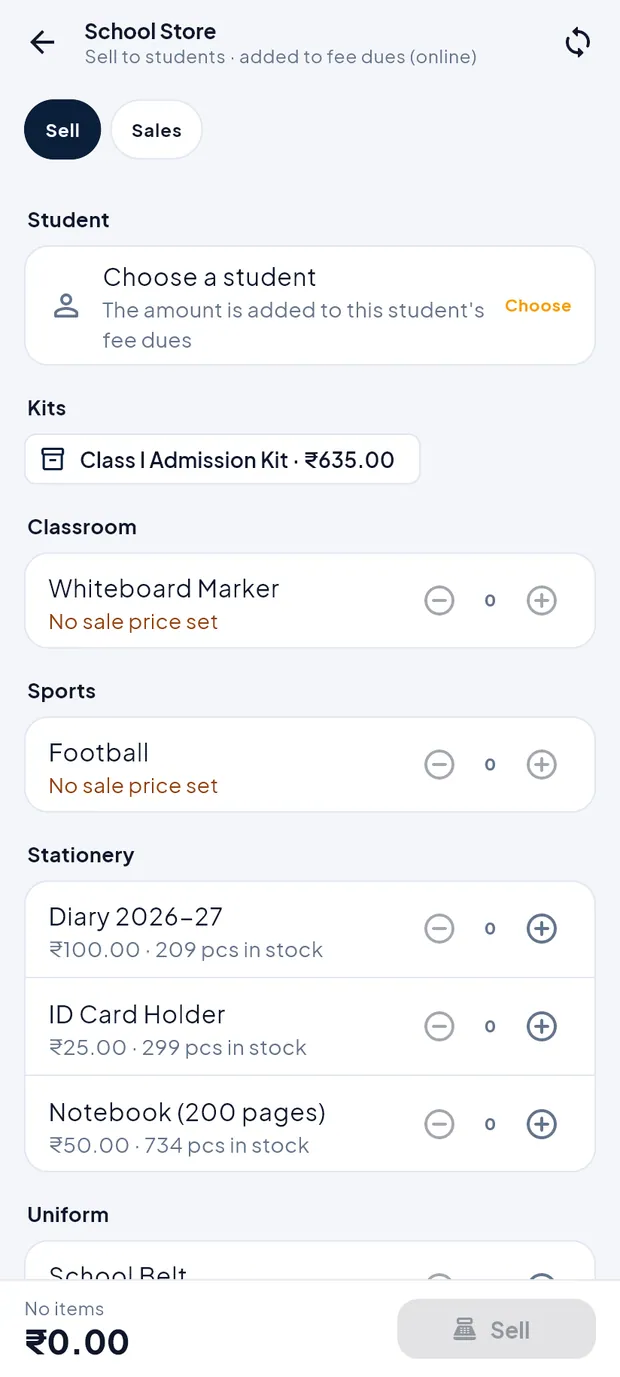
School Store, Sell tab, before choosing a student. Under Student, tap Choose and pick Aarav Sharma (search by name, admission number or father's name).
Tap + next to Diary 2026–27 and Notebook (200 pages). Tap a kit chip (e.g. Class I Admission Kit · ₹635.00) to add all its items at once. Items marked No sale price set cannot be sold.
Check the total at the bottom: 2 items ₹150.00. Add a Note (optional) if needed.
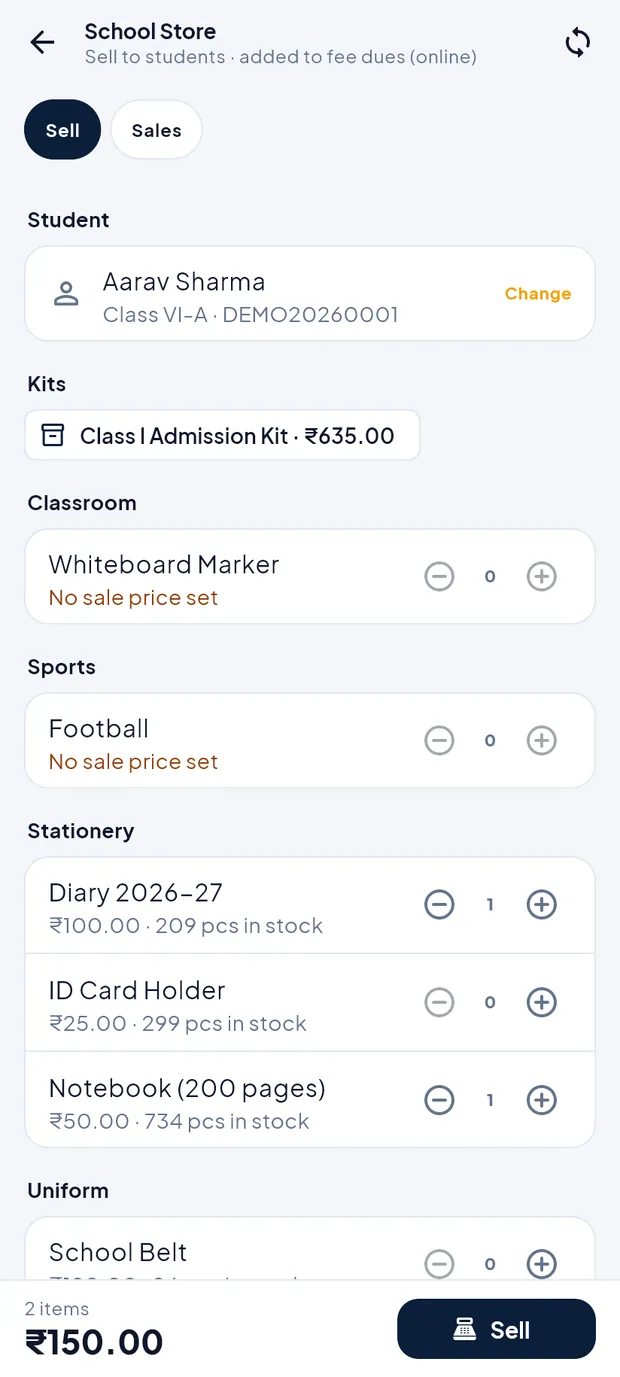
Two items added for Aarav Sharma. Tap Sell. The dialog explains that stock goes down now and the amount is added to the fee dues.
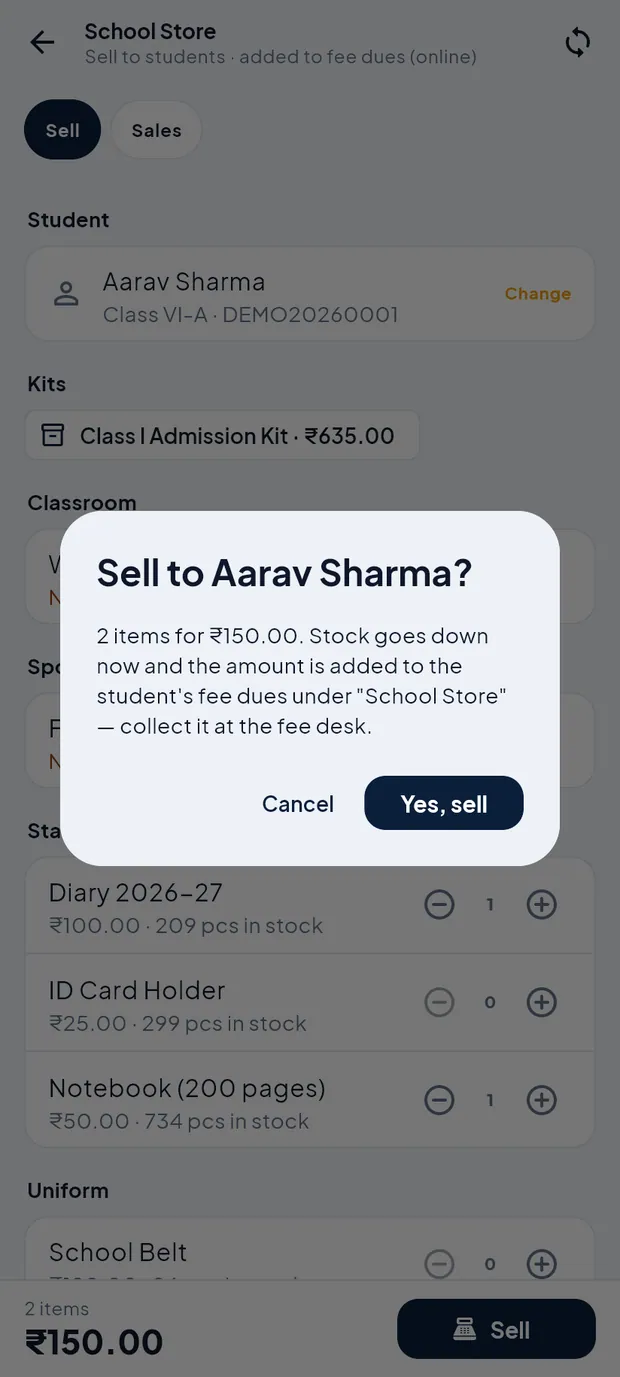
Sell to Aarav Sharma? 2 items for ₹150.00. Tap Yes, sell.
TipThe School Store works online only.
TipItems, prices, kits and stock are set on the website (Campus › Inventory).
See or cancel a sale
Tap the Sales tab. Each sale shows the number, student, date, items, amount and Paid or Unpaid.
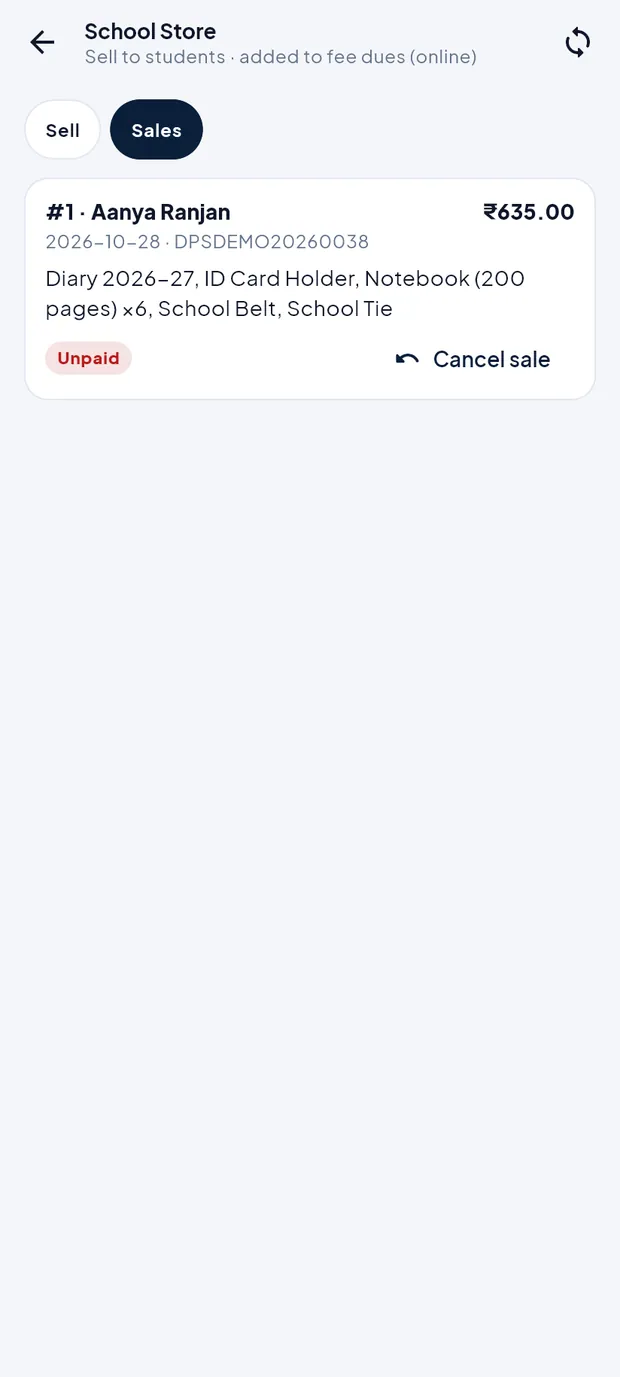
Sale #1 to Aanya Ranjan, ₹635.00, Unpaid. To undo a wrong sale, tap Cancel sale, type the Reason * and confirm with Cancel sale. The items go back into stock and the amount is removed from the student's dues. Tap Keep sale to leave it.
Transport and hostel
The app has no transport or hostel desk for staff. Use the website for these: Campus › Transport (routes, stops, vehicles, student allotment and transport fee) and Campus › Hostel (rooms, allotment and hostel fee). See the Transport and Hostel chapters of the web manual. Transport and hostel fees added there appear in the student's dues in the app and can be collected with Collect fee. Parents see the hostel room, block and warden in their app under More › Hostel.
Questions
I do not see School Store in More.
The School Store is an add-on. If the school does not have it, the app shows it as an add-on or hides it. Teachers never see it.
Can a teacher issue library books?
Yes, if the teacher has library access. The Library desk appears under More.